RSS

Category Archives: Uncategorized

Good Reviews Are Conversations

   Q: How do you know if a programmer is an extrovert?

   A: They look at your shoes when they talk to you.

I can say that, I’m a programmer. And an introvert. 😉 But that’s not the type of conversation I want to write about.

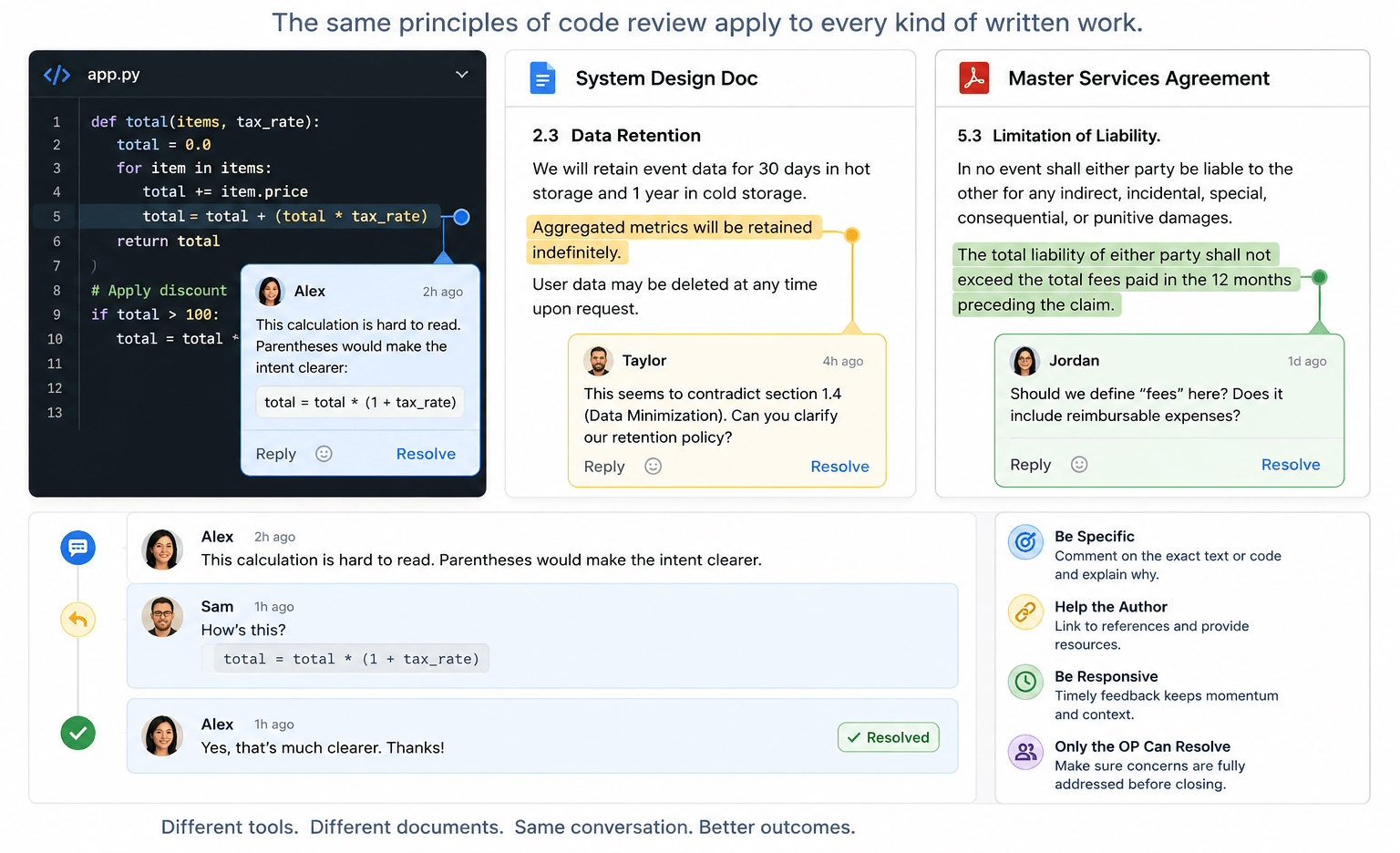
A code review is a conversation: someone asks a question or makes an observation and someone else responds. But it turns out the mechanics of a code review also apply to other types of written feedback. In the past few weeks, I’ve participated in reviewing code, design documents, and contracts. Along the way, I’ve recognized that a few guiding principles can help you get the most benefit out of the review process.

Be Specific

I mean this both in the sense of not being vague (“This seems wrong”) but also not being general. It’s rare that code or prose is so weak it needs to be rewritten from scratch. You almost always have a solid outline and one or more things could stand improvement.

  • In modern source control platforms, you can likely comment on a specific line of code.
  • In Google Docs, Microsoft Word, and such, you generally highlight the text you want to comment on.

Once you’ve picked the code or text to comment on, give specific feedback.

  • “This variable name is inconsistent with our usual style”
  • “I find this hard to read; parentheses would make this calculation clearer”
  • “This sentence lacks the serial comma that is recommended in our style guidelines”
  • “This seems to contradict section 2.3 earlier in the document”

Critique the Work, Not the Author

Good review comments focus on the artifact, not the person.

Weak: “You clearly didn’t think about edge cases here.”

Better: “It’s not clear to me what happens if the input list is empty.”

The distinction matters. The first version invites defensiveness; the second invites collaboration. Remember, the goal is to improve the work, not win the argument.

Help the Author

If there is an external authority (a style guide or RFC or Wikipedia entry) that supports your argument and gives the author resources, link to it. (If no such reference exists, consider if your comment is going to improve the code or text, or just satisfy your own style bias.)

Be Responsive

Distributed teams thrive on the asynchronous nature of cloud-based feedback loops. But the feedback needs to be timely. I’ve come back to a conversation that has languished and wondered, “What was I trying to say here?” Your team may be in different time zones or on different schedules so feedback in minutes or even hours may not be practical. But if your feedback cycle is measured in weeks, you’re probably spending too much time getting back up to speed as you dig in again.

Only the OP Can Resolve a Conversation

Only the original poster knows with confidence that their concern has been addressed. If the reviewer is confused, the author can’t just rewrite it and assume it is now clear! Waiting for the reviewer to acknowledge that their concern has been addressed may be the most important contribution to the success of the review.

Weak

  • Author: Would you look at this?
  • Reviewer: This paragraph is hard for me to follow.
  • Author: I rewrote it. (And resolves the conversation.)

The author has no way to tell if the new text is clear to the reviewer.

Better

  • Author: Would you look at this?
  • Reviewer: This paragraph is hard for me to follow.
  • Author: How’s this?
  • Reviewer: Yes, I understand. Thanks. (And resolves the conversation.)

Challenge: Do you see the bug in the Python code in the image at the top of this post?

 
Leave a comment

Posted by on May 27, 2026 in Uncategorized


Tags: ,

Say It with Fonts

I once worked with a technical writer who had the ironic initials DOC. I was occasionally diverted from my software development tasks to help her with technical documentation and I learned a lot from her.

One of the things I learned was how effective it can be to use a well-selected font to convey information. Any writer (and most readers) see the need for and use of different fonts for headlines vs. body text, and to add emphasis in one way or another. But one thing we did in that environment that has shaped my technical writing ever since is use a special font for user interface text.

As a brief aside, it’s helpful to understand the difference between a typeface and a font.

  • A typeface (sometimes called a font family) is a design for letters, numbers, and symbols that has some unifying design goal. A typeface is often referred to by name. I grew up with Helvetica. All the cool kids are using Aptos now. You’d recognize Impact as the typeface used for text over photos in memes, even if you didn’t know the name. Other examples are Courier and Bookman.
  • A font is a typeface with specific properties like height (usually in points), weight (light, normal, bold), style (italic, roman), and sometimes width.

Thus the font “Courier, 12 pt. bold” is a 12-point-high, bold rendering of the Courier typeface.

Bonus fact: in typography, “roman” generally means upright. That is in contrast to “italic” (or oblique) text, which leans to the right. (Confusingly, Times New Roman is a typeface and you can certainly use Times New Roman, italic as a font.)

Back to using fonts in technical documentation; Unlike content in newspapers and novels, technical documentation talks a lot about things you see on the screen and things you type in response. Often user input is rendered in a monospace typeface, one where every character has the same width. Many systems have good support for this. A common idiom for marking user input is with backticks (`). Markdown does this, GitHub comments, and even recent versions of Outlook Web Access implement it. (If you work in raw HTML, you can think of the backticks like <code> tags.) A common style for this is to render the text between the backticks in monospace (often Courier), one point size smaller than the surrounding text, and bold. With this convention, `this is user input` is rendered something like this is user input.

The innovation I learned from DOC is to also use a specific font for user interface text. The font needs to be different enough from the surrounding text to stand out but not so different that it’s unattractive. The general rule I use is: a narrow version of the body type, one point size smaller, and bold. In modern Microsoft Word, the body type is Aptos 12 pt. so my UI text is Aptos Narrow, 11 pt., bold. This might look like “Type a value in the Username field.”

Creating a UI Text Style

I find it strange that I have never found a system that has this built in. But I have developed some workarounds.

Trac

When I first worked with Trac, I added a macro that added UI text formatting. I wanted something easy to type but with a sort of “quoting” vibe (like backticks are backward single quotes). I settled on double less than (<<) and double greater than (>>), which I intended to be reminiscent of guillemets («, »). With this convention, “Type a value in the <<Username>> field” is rendered like the last example. I still use this nearly every day.

Desktop Microsoft Word

In Microsoft Word, you don’t need to write any Python to create new style.

  1. Find Styles in the Home ribbon.
    Styles section of Home ribbon in Microsoft Word
  2. Click the button on the right to expand the style box.
    Expanded Styles box in Microsoft Word
  3. Click Create a Style to open the Create New Style from Formatting form.
    Simple Create New Style from Formatting form in Microsoft Word
  4. Click Modify… to show more options in the form.
    Complete Create New Style from Formatting form in Microsoft Word
    • Enter a name of your choice.
    • Pick Character as Style type.
    • Pick Default Paragraph Font for Style based on.
    • Pick a font and size as appropriate. (Aptos Narrow works for recent versions of Microsoft Word where the default font is Aptos.)
    • Pick other options as desired.
  5. Click OK.

Now your new style is available to apply to any text in your document.

Microsoft Word Online

It’s not quite that easy in Office 365 (or whatever they are calling it this week). The online versions of Microsoft Office tools don’t have all the features of the desktop versions. However, the online and desktop versions work well together so you can add a style to an online document with the desktop tool. (No doubt this depends somewhat on what licenses you have and other details but this works for me.)

  1. In the online version of Word, drop down the Editing button and pick Open in DesktopEditing menu in Microsoft Word online
  2. When prompted, confirm you want to Open Word.
    Confirmation dialog to open Word on the desktop
  3. Create the style as above (or do whatever other editing you want to do).
  4. Close the desktop app (that’s all, just close it!).
  5. Click Continue Here in the online app
    Confirmation dialog to continue editing online
 
Leave a comment

Posted by on November 12, 2025 in Uncategorized


Tags:

Test 25x Faster!

My very first professional programming project was debugging and completing a lab automation system written in BASIC. It ran on a desktop HP computer and controlled instruments and equipment through GPIB. The challenge was that it controlled experiments in “real time,” not the “really fast response” that “real time” often means, but rather by the clock. It would do something, wait a minute or 15 minutes or something, do the next thing, wait a while, etc. The system started with bugs fairly early in the run of the experiment so I could start the program running, take a short break, and come back to find the program had crashed. I’d figure out what went wrong, fix it, and start the program again. But this time the program didn’t crash in the code I’d just fixed; it ran longer and crashed in 10 minutes instead of the previous five. Do you see where this is going? Eventually, I had to wait hours for the next crash and the better the code got, the longer I had to wait to fix the next issue!

My current team also does work that has to happen by the clock. The software counts some things and takes certain actions at certain limits. The counts reset at the end of the period which might be an hour, a day, a week, or a month. We can fake the data that causes the counts to change, but we don’t want to wait around to see if a monthly action works as it should. And messing with the system clock to fool the software is messy. Fortunately, one of the most interesting aspects of the system (one that we need to test carefully and repeatedly to avoid regression) involves when things are supposed to happen at different time scales. Do things that happen at a small time scale interact appropriately with things that happen at a larger time scale?

Once we were confident that the system properly recognized the end of an hour, day, etc. (in core code that was unlikely to change), we sought a way to speed up testing of other features so we didn’t have a month-long test in our release process. What we realized is that an hour is 1/24 of a day and a day is around 1/30 of a month. So if our production system is primarily concerned with days and months, we can take production configuration, change days to hours and months to days, and test in roughly 1/25 of the time. An overnight test with this substitution effectively tests two weeks (14-18 days) of real execution that straddles a month boundary. A weekend-long test covers 3-4 months of real world cycling through the logic in the system! And we don’t have to disable NTP or play any other shenanigans with the system time.

Just don’t ask me what happens around Daylight Saving Time transitions.

 
Leave a comment

Posted by on June 17, 2024 in Uncategorized


Tags: , ,

Everything Old is New Again

Imagine a data processing system that takes advantage of local computing resources to provide a rich user experience and robust data validation while offloading a central computing system. It presents complex forms composed of smart fields that prevent entry of invalid data. Much of the validation is done locally, based on attributes applied to the fields to provide prompt feedback. However, when necessary, input can be validated against lists of values retrieved from the central system. When the form is complete, the user submits the data to the central system as a package that gets processed all at once before returning a success indicator or a failure indicator with a possible list of error messages to guide revising the data for resubmission.

Some readers will think it obvious that the data processing system is the World Wide Web. HTML forms — especially when souped up with modern web frameworks — support complex data validation and submit fields to a web server to update centrally stored data. If you’ve ever bought anything from an eCommerce site, you’ve used this technology.

However, as I was writing the first paragraph, I was not thinking of PCs running web browsers and data centers full of web servers, I was describing mainframes and their terminals. Undoubtedly, the web browser provides a more rich and responsive user experience than a 3270 terminal (which, among other things, lacked graphics), but diagrams of communication between parts of the old and new systems are identical in all but details.

I can’t say if the designers of HTML modeled their form system on mainframe data entry but it kind of looks like it. If they didn’t, they might have made their job easier had they done so. The suggestion that a programmer should not reinvent the wheel is often interpreted as applying to recreating other contemporary technology with similar features. However, it also means being aware of the history of computer science and technology in sufficient detail that you can learn from historical systems to make your job easier and your system stronger.

 
Leave a comment

Posted by on April 29, 2024 in Uncategorized


What Makes a Great Programmer

I once worked with a great programmer who had a sign on his wall that said:

The Three Qualities of a Great Programmer: Laziness, Impatience, and Hubris

All of those sound like negative attributes but considered in the right light, they are very insightful. I’ve thought of them often in the years since I read them on his wall.

Laziness

A great programmer is too lazy to perform simple, repetitive tasks and would rather spend two hours writing a script to do a task than 10 minutes doing the same task. (This always reminded me of a short story I once read about a young student too lazy to do their homework so they invented a machine to do it for them.)

Of course, if the task is only done once, automating it is not very practical. But if it’s preparing a weekly report or something, the scripting time is very well spent and pays for itself fairly quickly. And that ignores the fact that someone else can now run that script, can read it to learn about the process, etc.

Impatience

A great programmer is too impatient to wait for a slow-running program to finish, especially if that program does a repetitive task (see above) the programmer wants it to be fast so they can review the output and get on with other work.

Human interaction with a computer is incredibly sensitive to delay in response. If you’ve ever worked with a laggy mouse with a low battery, you know how it feels to have your actions take too long to take effect. Similarly, if you’re running a spreadsheet macro or small program it has to respond in well under a second or you lose flow and get frustrated. If the code originally took 1.5 seconds to run, making it run in 8/10 of a second may not seem a big improvement but it is the difference between a smooth work flow and a frustrating one, the difference between a tool you’ll come back to and come to rely on, and one you’ll set aside and not use.

Hubris

Maybe a great programmer isn’t hubristic. Maybe this is the humorous entry in the list. On the other hand, good software can save bad hardware. And it can do it after you ship. I’ve heard it said, “you can do anything in software” and I almost believe it.

A great programmer is likely to see a challenge and say, “I can do that!” Hubris? Confidence? Optimism? Maybe some of all of those. A meek programmer may look at the same problem, think it impossible, and not dive in. Without a certain measure of hubris, some of our greatest software systems might not exist. Their creators saw a challenge and believed they were up to it, and we all benefit from that.

 
Leave a comment

Posted by on April 23, 2024 in Uncategorized


Three Rules for Managing a Software Team

The bus factor of a team is a colorful illustration of the risk of having unique resources. How many team members could get hit by a bus without crippling the team? Less gruesomely, how many could be out with an illness? Or, more kindly, how many could take vacation time at once? Early in my career, I learned that if you’re irreplaceable, you’re unpromotable. And as long as I’ve managed software development, I’ve been acutely aware of the team’s bus factor. I think I also had an inkling of something that I’ve only recently put into words, perhaps a corollary of the bus factor. I’ve start thinking of these considerations in terms of three rules.

No Singletons

In a software system, a singleton is a unique resource for which you work to make sure there is only a single instance. Having a high bus factor (low risk from having a team member unavailable) means not having a singleton on the team.

Rule 1: Nothing the team does should be done by only a single member of the team.

No Specialists

What I’ve recently realized is that a singleton may also be a specialist. Not only are they the only one who does a certain task, but they may spend so much time doing it that they aren’t involved in any other work of the team. If that task is no longer relevant (technology evolves), what do you do with that person who knows your business and processes but only contributes to one narrow part of it? The answer is that you shouldn’t put people in that awkward position. If you need a specialist, hire a consultant. But if you have someone on your team with a specialty, you owe it to the team and the individual member to cross train them on other things you do.

Rule 2: No one on the team should do only one thing the team is responsible for.

No Exceptions

I’ve mostly managed small teams where I’ve been an active contributor to the code base, even if only part time. In that sense, I’m not a specialist. And when I write code, I am not exempt from our usual process: someone reviews and approves my code before it goes into production. An experienced developer can point out errors in my approach or implementation, but even a relatively new developer can ask insightful questions from a naive perspective. I am diligently humble enough to accept input from reviewers that I lead.

But if I am not a specialist, neither should I be a singleton. I could get hit by a bus. Or get sick (as happened recently). Or take some time off. In my absence, someone else can lead a team meeting or make an informed decision and work goes on. I talk to my team frequently about business requirements and other constraints not only to guide their minute-to-minute development decisions but so that the team doesn’t have a leadership singleton.

Rule 3: The first two rules apply to everything, including team leadership.

 
Leave a comment

Posted by on April 10, 2024 in Uncategorized


Tags:

Language Shapes Thought

My wife is a public relations professional. She works daily with the English language. When reviewing or editing a colleague’s or client’s writing, she is constantly looking to see if it is clear and if it is correct. English has rules and while they may be looser than those imposed by computer languages, they are important to clear communication. We frequently discuss the irony that when I am reviewing code, I am doing the same thing but in various computer languages. I work to make sure the code clearly communicates intent to the computer and comments clearly communicate intent to other developers.

Some formality can be achieve with things like UML but, for the most part, my colleagues and I talk about code using English. We might say that two files in the same directory are “siblings.” Or that one node in a DAG is a cousin to another. These kinds of relationships are important and I’ve found myself realizing that there’s no easy way to refer to a parent’s sibling. Of course English has “aunt” and “uncle” but those gendered words don’t fit well in computer science.

I was reminded of this recently when I read A Psychologist Explains How The Language You Speak Manifests Your Reality in Forbes. It talks about how language shapes perception and what you can convey. In Mandarin, it seems, the word you choose for “aunt” conveys whether she is on your father’s or mother’s side, as well as whether she’s an aunt by birth or marriage. (They don’t say if there is a vague, gender-neutral word for “parent’s sibling.”) I was also intrigued by Bilingualism Is Reworking This Language’s Rainbow (in Scientific American) which discussed how some human languages are better than others for describing a range of colors.

Similarly, computer languages restrict what you can express easily, and in some cases limit what you can do at all. Early in my computer science education, I took a course called “Computer Languages.” It was a survey course designed to introduce students to varied languages. It covered APL, LISP, Fortran, and SNOBOL. The instructor drove home the strengths and weaknesses of the languages by having us use each language to solve a problem it was ilsuited for. We were tasked with solving the travelling salesman problem in Fortran. That is a classic illustration of the power of recursion, often used to demonstrate how LISP works. But Fortran does not support recursion!

It is said that to a man with a hammer, every problem looks like a nail. If Fortran was the only language in my toolbox I could be forgiven for using it when presented with a problem better suited to LISP or C. But my toolbox contains more than a dozen languages. I can and do pick from a handful of modern candidates when picking the tool for a new problem.

As a hiring manager, I’ve often said that I would prefer not to hire a developer who only knows one language. But even two similar languages are fairly limiting. I’d look for a compiled language and a scripting language. Or a procedural language and a declarative language. If you know C, you can get up to speed on C# fairly quickly. But if all your experience is in procedural languages, you’re likely to write a lot of loops in C# instead of using LINQ. If you know SQL, then LINQ feels natural. Like a Tsimane’ speaker borrowing azul from Spanish to describe blue, knowing multiple computer languages allows you to express more programs more clearly than you could otherwise.

Languages — human and computer — grow by borrowing from other languages. Speakers and programmers benefit from knowing more than one language, even if they routinely use just one. Go learn another language; whether it is your 3rd or 13th you’ll be a better programmer for it.

 
Leave a comment

Posted by on March 20, 2024 in Uncategorized


Tags: ,

Not So Intelligent

A long time ago I implemented a program that learned to play Tic Tac Toe. I was a new programmer and not particularly skilled but I’d read an article about how someone had taught a matchbox to play and I thought I was at least that good. The article I’d read was in Scientific American but you can read about MENACE today on Wikipedia. The original work was “AI” in 1961! My program started out only “knowing” the allowable moves and as we played it “learned” strategy. After a dozen or so games, I couldn’t beat it. Even though I wrote it, I marveled at this program’s behavior.

Arthur C. Clarke famously said, “Any sufficiently advanced technology is indistinguishable from magic.” There are 512 possible final boards of Tic Tac Toe and more than 250,000 games (paths from an empty board to one of those 512 finishes). This is on the border of the ability of a human to inspect and understand. The fact that I didn’t really know how my program kept me from winning Tic Tac Toe didn’t make it magic, it was just sufficiently complex that I couldn’t intuit its inner workings. (I was a novice programmer then but decades years later I still find wonder in this program.)

Like those matchboxes and my novice program, a lot of things these days are called “artificial intelligence” but how intelligent are they? I’d argue, “not very.”

Neural Networks

Many AI systems — including my program — are trained to achieve their goal. The system starts with some constraints and rules then by exposing it to data (games of Tic Tac Toe, for instance), you train it or it learns how to behave in a way that seems intelligent.

One type of system that can be trained to seem intelligent is a neural network, based at least loosely on a limited understanding of how the brain works. With a neural network (NN), you repeatedly apply inputs and desired or expected output, and the network magically sets itself up to produce that output when the same or similar inputs are presented. (Please take a hint from the use of “magically” to realize that I’m being vague and general. I’m sure I’ve got details wrong.)

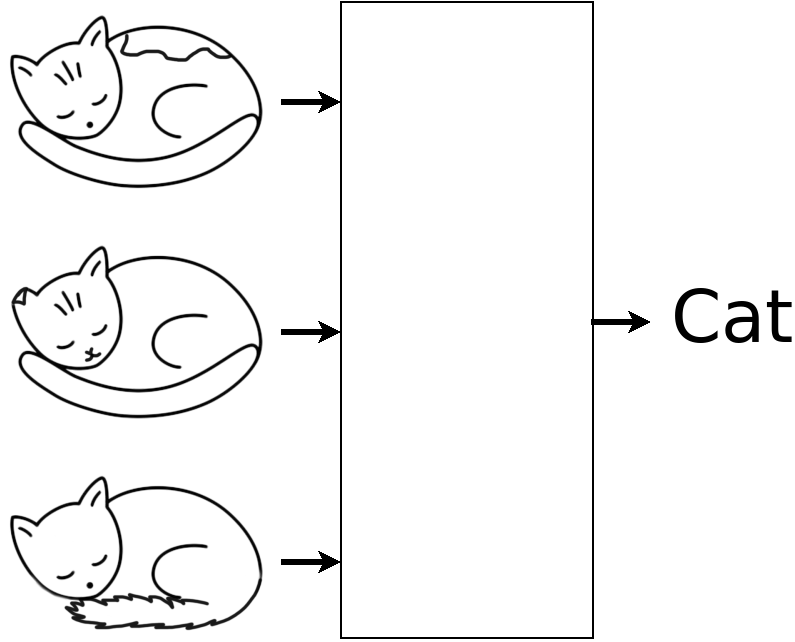
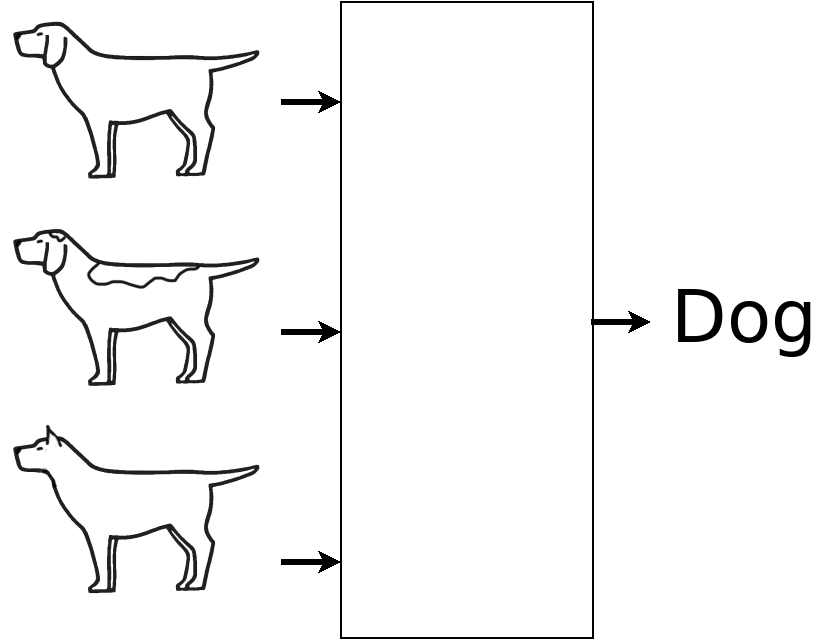
A common demonstration of neural networks is classification of data like images or audio clips. After training, you might use a NN to try to tell if a sound came from a flute or a saxophone, or what kind of animal was in a picture. Say you had several (or several hundred) images of cats and dogs. You might try to train a neural network to discriminate between them.

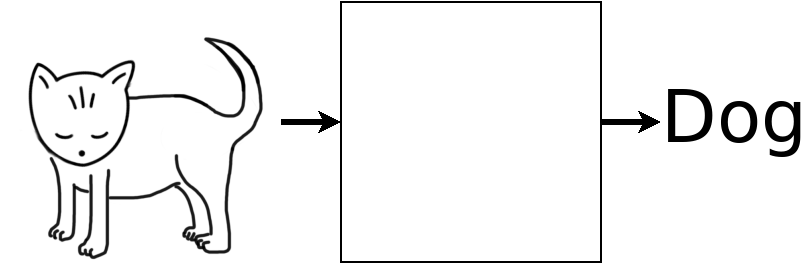
The test is trying the NN on a novel input.

What Went Wrong?

Somehow, the NN might have noticed that the cats all have a horizontal stroke at the bottom center but the dogs are all hollow. That fits the training data and leads to the same wrong conclusion with the test data.

Whatever the method, the NN focused on the wrong feature of the input and drew the wrong conclusion. When shown an image of a standing animal, it labeled it a dog. This is a classic example of GIGO: garbage in, garbage out.

Considering this small training set, we could try to fix the problem by adding standing cats and sitting dogs to the training images. Then the NN might focus on pointy tails or some other irrelevant feature and still reach the wrong conclusion. (Challenge: can you explain the difference between a cat and a dog well enough for another person following your directions to properly conclude the last image is a cat?)

Humans are great at pattern recognition and extrapolation, at least to the limits of our capacity. We can look at the data we trained the NN with and see things that might be wrong. But if you trained the NN on thousands of drawings (or thousands of photos!), it would be nearly impossible for a human to review the training data, determine the problem, and fix it. The larger the data set, the harder it is to tell what is wrong or to correct the problem.

Generative “AI”

If you play Scrabble or Wordle, you are likely familiar with the fact that “e” is the most common letter in English text. Different analyses show “t” or “a” second. As you might expect, “q” and “z” are fairly uncommon. What if you looked for the frequency of two-letter combinations? You might think “th” would be fairly common (indeed, it’s the most common) and something like “qz” fairly uncommon or absent. Things get interesting with three-character combinations; It turns out they embody a lot of the word-forming rules of the language. If you “randomly” generate text that adheres roughly to the same frequency of trigrams as the original language, you get something that is readable nonsense. Readable, because all the letter combinations look familiar to us and we can sound them out. Nonsense because there are very few actual words in the text.

What if, instead of the frequency of one letter following another, we considered the frequency of one word following another. If we had a large volume of text to train the system with, we could generate novel text from that training set.

If you used all of Shakespeare’s plays as a training set and asked the system to generate some text, it could. The output might be fairly readable (though it likely wouldn’t have much of a plot). But it would be in Shakespeare’s English, not modern, with nary an acronym or neologism in sight. And it would be more like a play than the sonnets Shakespeare is also famous for.

While Shakespeare was prolific, his collected work is still a small part of a small library. And it is microscopic compared to all the text on the Internet: digitized books but also software user manuals, scientific papers in online journals, social media posts, and on and on. That huge volume of text is what is used to train large language models (LLMs). Once the LLM is trained with a large fraction of the Internet, you can ask it to generate novel content. This content will sometimes be gibberish but a really good system will produce text that seems quite coherent.

If a LLM’s training material includes racist rants on social media, there’s a chance it will generate text that reflects that bigotry. Does the LLM have a conscious bias against certain people? No, it’s not even conscious. But it can look that way. And it’s not a good look. Remember GIGO. The system reflects the strengths and weaknesses and biases of the input. Do cats always lie down? Are plays always in Shakespeare’s voice?

A lot has happened since 1961 and many years since have been labeled the “year of AI.” Recent developments have lead to AI techniques yielding more useful applications. Maybe that year has finally come. With AI as with many things, we should be mindful of creators’ intent and the systems’ affects but let’s not cloak such applications in mystery.

 
1 Comment

Posted by on February 25, 2024 in Uncategorized


Password Policies

While Two-factor Authentication is an important tool in keeping your accounts secure, it should definitely be used with good passwords.  News of a digital break-in is usually accompanied by advice to change your password, not only on the compromised site but on any others where you may use the same password. As I’ll explain below, the connection between sites isn’t some sort of collusion; it arises naturally from the science and technology of encryption. And while encryption relies on some complex math to work, a useful understanding can be gained with no math at all.

One-Way Encryption

Encryption manipulates data so it is no longer recognizable. Some encryption is reversible (so you can get back the original data with more processing) and some is one-way (you cannot decrypt the encrypted data). One-way algorithms are sometimes called meat grinder algorithms; hamburger may be tasty but you can’t make a steak out of it.

Among other advantages of such an algorithm is that it can be quite fast and, rather obviously, fairly secure. A common use of one-way encryption is hashing. Not to be confused with hashtags in social media, in computer science a hash is a short, fairly unique representation of another, usually larger, piece of data.

A very simple hash might just add up the parts of the input to produce a single number as the output. If we say A is 1, B is 2, etc. then to hash “ABC” we add 1 + 2 + 3 = 6. Notice that if we hash “BD” we also get 6 (2 + 4). I said that the hash value is “fairly unique” and while more complex hashes are better than this, there is always the possibility of a collision, two items that hash to the same value.

One-way encryption is useful when you want to know if two things are (likely) the same without being concerned with what those things actually are and this makes it really useful for storing passwords. When you set your password, the system hashes it and stores the result. Later, when you try to log in, the system hashes what you type and compares it to the stored hash. If the hashes match, you’re in. The better the hashing algorithm, the lower the chance of collisions, and the more certain the system can be that you supplied the same password.

Rule 1: If a website or system can tell you your password when you forget it, it isn’t storing it properly. Treat that system as if it is open and has no passwords. Better yet, don’t use that system.

Most hash functions can hash any size input and produce a hash with a uniform size. For example, SHA1 (Secure Hash Algorithm 1) always creates a 20-byte output. This makes the comparison of hashes quick and easy while still minimizing collisions. (You’d have to try roughly one septillion (1 followed by 24 zeros) random strings before finding a collision.) But because a hash function is fairly fast and can accept any size input, your password can be quite long.

On the other hand, some systems arbitrarily limit the length of your password (or, worse, ignore anything after a certain length). If the limit is eight characters, “abcd1234$” and “abcd1234@” hash to the same value and are, essentially, the same password.

Rule 2: If a website or system has an upper limit on how long your password can be, it doesn’t really take security seriously. Complain, be cautious, and consider using another system if you have options.

You’ve no doubt experienced forgetting or flubbing your password and getting locked out of a system after a few tries. That might make you ask, “Who cares if one in a gazillion inputs hash the same as my password; the bad guys can only guess three times.” That would be true if the bad guys were trying to log in the way you do. But what they actually do is break into the computer (there are various ways) and steal the list of user names and hashed passwords. Each item in that list looks something like:

User Name Password Email Address
cnelson F817710AF2D16A7F1124FE906779DCB2A2BB0ABB Chris.Nelson.PE@Gmail.com

With that data on their computer, the bad guys can guess a password, generate the hash (remember that’s fast), and compare it against the hash they stole. If it doesn’t match, they guess another. If it does match, they have something that is as good as your password, even if it is really just the result of a hash collision. They can go to the system, enter your user name and their guessed password, and then access your account in one step with no risk of lock out. (This is why some systems will alert you to a new log in to your account. If you know it wasn’t you, you can start to take steps to recover.)

Rule 3: If the system has a feature to notify you of new logins, enable it. It won’t prevent a breakin but it may allow you to minimize the damage.

I have five or six different accounts for my job. I use some of them daily and some only monthly. And don’t get me started on listing my personal passwords: my bank, car insurance, health insurance, cell phone carrier, social media, online shopping, etc. There is a temptation to use the same password on all the systems so I don’t have to remember so many but if any of those systems get compromised and the bad guys guess my password, they can at least try that password on other systems with some chance of success.

The problem is this: encryption is hard. It’s a truism in software that you should never try to develop your own security software. As a result, the most secure, well-managed systems use one of several reliable methods to hash and store passwords and the hash of your password on one site may very well match the hash on another.

Rule 4: Use a different password on every system, at least every important system. I’m not sure how much I’d care if someone used my Netflix or Spotify account.

You may wonder what “guess a password” means? First, security researchers have compiled lists of common passwords and bad guys will start with those and hope they get lucky. Second, passwords are often made of a few words and a few digits like “pizzalover12” or “bestgrandma2007.” Here linguists have helped the bad guys by compiling lists of common English words; you are much more likely to incorporate “zoo” than “xeric” in your password.

Rule 5: Avoid common words and phrases in your passwords.

Common passwords are common because they are easy to remember and/or type. Common words are easy to type because they are used frequently. So how do you remember many unique, uncommon passwords and not mistype them so often you lock yourself out? My best advice is don’t remember them and don’t type them.

In the Google software ecosystem, the Chrome browser and the Android operating system have features to suggest “strong” passwords, remember them for you, and fill them in when you visit a site or use an app again. This does mean that if Google is ever compromised all of your passwords are exposed at one time (though I hope and assume they use strong two-way encryption to store them).

A Google solution doesn’t help much if you use Firefox and Android or Chrome and an iPhone or some other combination of products. There are password manager programs for computers and phones (some free, some paid) that give you independence from a specific supplier. Some store your list of sites, user names, and passwords on your own computer or phone so you control it. I have used KeePass for years for just this reason.

Rule 6: Use a password manager to store your various passwords.

So now you know why you need long, unique passwords on all the systems you use. Go get yourself a password manager and start using it.

Resources

KeePass: https://keepass.info/download.html (includes links to compatible Android and iPhone apps)

PC Magazine’s roundup of the best password managers: https://www.pcmag.com/roundup/300318/the-best-password-managers


Client Management with Git

I don’t mean to suggest that Git is a CRM tool, but rather that Git has features that you can employ to manage code for multiple clients in ways that make them happier and you more efficient.

At various times in my career, I’ve worked on code that was mostly shared across projects for several different audiences. As an independent consultant, I had utility code that I employed solving problems for various clients. As a developer at a maker of OEM systems, I lightly customized common feature code for numerous customers. And when building plugins for large systems, a lot of glue and foundation code can be shared between different implementations.

The legal agreements around such work often require that the client have access to the source but, in my experience, that access is rarely exclusive. If you can make common code common and still share all the code used by a client with that client, you are more efficient because you don’t have to reinvent the wheel every time and they receive more robust solutions that build on code shared with other implementations. It’s not quite the “many eyes make all bugs shallow” ideal of open source, but it has some of the same advantages. The key to this reuse is disciplined branch management. In the rest of this post, I’ll show you how.

Consider a project being done for Acme Widgets, developed with an eye toward portability and modularity. Details of software modules and implementation language really don’t matter, so I’ll simplify the discussion by illustrating with changes in a single text file.

Document Title

This document describes some software.

It has features.

It is customizable.

We get started by creating a repo for shared source and putting this text in a file, doc.txt.

$ mkdir shared
$ cd shared/
$ git init
Initialized empty Git repository in C:/Code/blog/shared/.git/
$ touch .gitignore
$ git add .gitignore
$ git commit -m "Shared: Initial commit"
[master (root-commit) 33dd3c5] Shared: Initial commit
 1 file changed, 0 insertions(+), 0 deletions(-)
 create mode 100644 .gitignore
$ emacs doc.txt
$ git add doc.txt
$ git commit -m "Shared: First version of document"
[master 85d0374] Shared: First version of document
 1 file changed, 7 insertions(+)
 create mode 100644 doc.txt

Let’s add some common features:

Document Title

This document describes some software.

It has features.

* Feature 1
* Faeture 2

It is customizable.

This common “code” is still on the master branch

$ git diff
diff --git a/doc.txt b/doc.txt
index f1cfe19..2c3bf02 100644
--- a/doc.txt
+++ b/doc.txt
@@ -4,4 +4,7 @@ This document describes some software.

 It has features.

+* Feature 1
+* Faeture 2
+
 It is customizable.

$ git add doc.txt
$ git commit -m "Shared: Add features 1 and 2"
[master 975c1d3] Shared: Add features 1 and 2
 1 file changed, 3 insertions(+)

Now that there is a base to build on, let’s start working on client-specific work. First, we create a repository for the client’s view of the project.

$ cd ..
$ mkdir acme
$ cd acme
$ git init
Initialized empty Git repository in C:/Code/blog/acme/.git/

Then, we make that client repository a remote for our shared repository.

$ cd ../shared
$ git remote add Acme file:///c/code/blog/acme
$ git remote
Acme

And make a client-specific branch in the shared repository.

$ git checkout -b acme
Switched to a new branch 'acme'

And add client notes to the document.

Document Title

This document describes some software.

It has features.

* Feature 1
* Faeture 2

It is customizable.

Acme-specific features include:

* Feature A
* Feature B

And check them in on the client-specific branch.

$ git diff
diff --git a/doc.txt b/doc.txt
index 1dda3c5..737c272 100644
--- a/doc.txt
+++ b/doc.txt
@@ -8,3 +8,8 @@ It has features.
* Faeture 2
It is customizable.
+
+Acme-specific features include:
+
+* Feature A
+* Feature B
$ git add doc.txt
$ git commit -m "Acme: Add features A and B"
[acme 89547d7] Acme: Add features A and B
 1 file changed, 5 insertions(+)

In discussion with Acme, you find that their Feature C really has general utility, so you choose to add it as Feature 3 to the common code. To do this we work on the master branch then merge that common change onto the client branch.

[master 53f5a0c] Shared: Add feature 3
$ git checkout master
Switched to branch 'master'
$ emacs doc.txt
$ git diff
diff --git a/doc.txt b/doc.txt
index 2c3bf02..5daa37c 100644
--- a/doc.txt
+++ b/doc.txt
@@ -6,5 +6,6 @@ It has features.

 * Feature 1
 * Faeture 2
+* Feature 3

 It is customizable.
$ git add doc.txt
$ git commit -m "Shared: Add feature 3"
[master 53f5a0c] Shared: Add feature 3
 1 file changed, 1 insertion(+)

$ git checkout acme
Switched to branch 'acme'
$ git merge master
Auto-merging doc.txt
Merge made by the 'recursive' strategy.
 doc.txt | 1 +
 1 file changed, 1 insertion(+)

All this work is local and has a global view of common and client-specific features. When it is time to share the development with the client, you push just the client-specific branch to the client-specific repository.

$ git push Acme acme:upstream
Counting objects: 18, done.
Delta compression using up to 4 threads.
Compressing objects: 100% (16/16), done.
Writing objects: 100% (18/18), 1.60 KiB | 0 bytes/s, done.
Total 18 (delta 5), reused 0 (delta 0)
To file:///c/code/blog/acme
 * [new branch] acme -> upstream

Your work for Acme is done and you are lucky enough to land a new contract with Evil Corp. You negotiate with them to implement Feature 4 (something sufficiently generic that other clients might use it) and Feature Alpha just for them. Evil Corp benefits from your work for Acme and you begin by checking out the master branch and implementing Feature 4.

$ git checkout master
Switched to branch 'master'
$ emacs doc.txt
$ git diff
diff --git a/doc.txt b/doc.txt
index 5daa37c..2f6a3a6 100644
--- a/doc.txt
+++ b/doc.txt
@@ -7,5 +7,6 @@ It has features.
 * Feature 1
 * Faeture 2
 * Feature 3
+* Feature 4

 It is customizable.
$ git add doc.txt
$ git commit -m "Shared: Add feature 4"
[master c5ee2e8] Shared: Add feature 4
 1 file changed, 1 insertion(+)

Then create a client-specific branch for Evil Corp and add their feature.

$ git checkout -b evil
Switched to a new branch 'evil'
$ emacs doc.txt
$ git diff
diff --git a/doc.txt b/doc.txt
index 2f6a3a6..53108fc 100644
--- a/doc.txt
+++ b/doc.txt
@@ -10,3 +10,7 @@ It has features.
 * Feature 4

 It is customizable.
+
+Evil Corp features include:
+
+* Feature Alpha
$ git add doc.txt
$ git commit -m "Evil: Add feature alpha"
[evil 65eab70] Evil: Add feature alpha
 1 file changed, 4 insertions(+)

In testing the release for Evil Corp, you find and fix a problem with Feature 2.

$ git checkout master
Switched to branch 'master'
$ emacs doc.txt
$ git diff
diff --git a/doc.txt b/doc.txt
index 610f380..2f6a3a6 100644
--- a/doc.txt
+++ b/doc.txt
@@ -5,7 +5,7 @@ This document describes some soft
 It has features.

 * Feature 1
-* Faeture 2
+* Feature 2
 * Feature 3
 * Feature 4

$ git add doc.txt
$ git commit -m "Shared: Fix a bug in feature 2"
[master 4488af0] Shared: Fix a bug in feature 2
 1 file changed, 1 insertion(+), 1 deletion(-)

And merge that fix into the Evil branch.

$ git checkout evil
Switched to branch 'evil'
$ git merge master
Auto-merging doc.txt
Merge made by the 'recursive' strategy.
 doc.txt | 2 +-
 1 file changed, 1 insertion(+), 1 deletion(-)

Finally, you deliver the code to Evil Corp.

$ cd ..
$ mkdir evil
$ cd evil/
$ git init
Initialized empty Git repository in C:/Code/blog/evil/.git/
$ cd ../shared/
$ git remote add Evil file:///c/code/blog/evil
$ git push Evil evil:upstream
Counting objects: 24, done.
Delta compression using up to 4 threads.
Compressing objects: 100% (22/22), done.
Writing objects: 100% (24/24), 2.17 KiB | 0 bytes/s, done.
Total 24 (delta 7), reused 0 (delta 0)
To file:///c/code/blog/evil
 * [new branch]      evil -> upstream

At this point, Acme notices the bug in Feature 2 and asks you for a fix. Lucky you, you already fixed it. If Acme is willing to accept Feature 4, you can just merge your master to acme.

$ git checkout acme
Switched to branch 'acme'
$ git merge master
Auto-merging doc.txt
Merge made by the 'recursive' strategy.
 doc.txt | 3 ++-
 1 file changed, 2 insertions(+), 1 deletion(-)

If they are not, you can cherry-pick the fix for Feature 2 from master to acme. In either event, you then push your update to them.

$ git push Acme acme:upstream
Counting objects: 9, done.
Delta compression using up to 4 threads.
Compressing objects: 100% (9/9), done.
Writing objects: 100% (9/9), 907 bytes | 0 bytes/s, done.
Total 9 (delta 3), reused 0 (delta 0)
To file:///c/code/blog/acme
   20a8851..eb3f53a  acme -> upstream

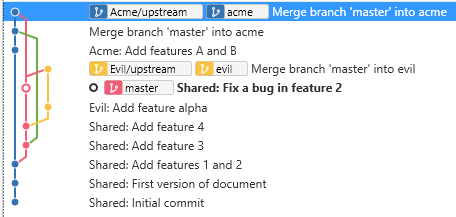
At this point, you can see your work for both clients.

Overview of all code

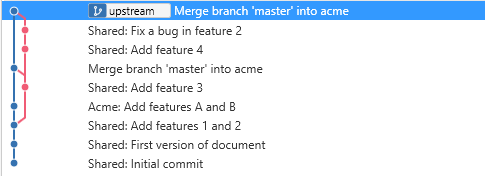
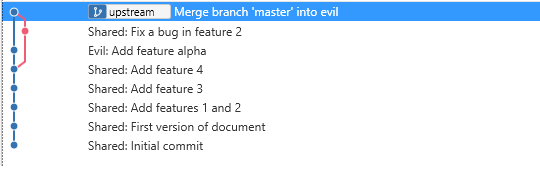
But your clients can only see the common code and their client-specific code.

Acme’s view of their code

Evil Corp’s view of their code

Furthermore, your clients can update their code (or the common code) and share it with you on their upstream branch. You can fetch that branch and cherry-pick fixes from it to your master branch to share with other clients as appropriate.
 
Leave a comment

Posted by on March 19, 2018 in Uncategorized