RSS

Author Archives: Christopher Nelson

Unknown's avatar

About Christopher Nelson

Professional Software Engineer interested in software quality and usability.

Good Reviews Are Conversations

   Q: How do you know if a programmer is an extrovert?

   A: They look at your shoes when they talk to you.

I can say that, I’m a programmer. And an introvert. 😉 But that’s not the type of conversation I want to write about.

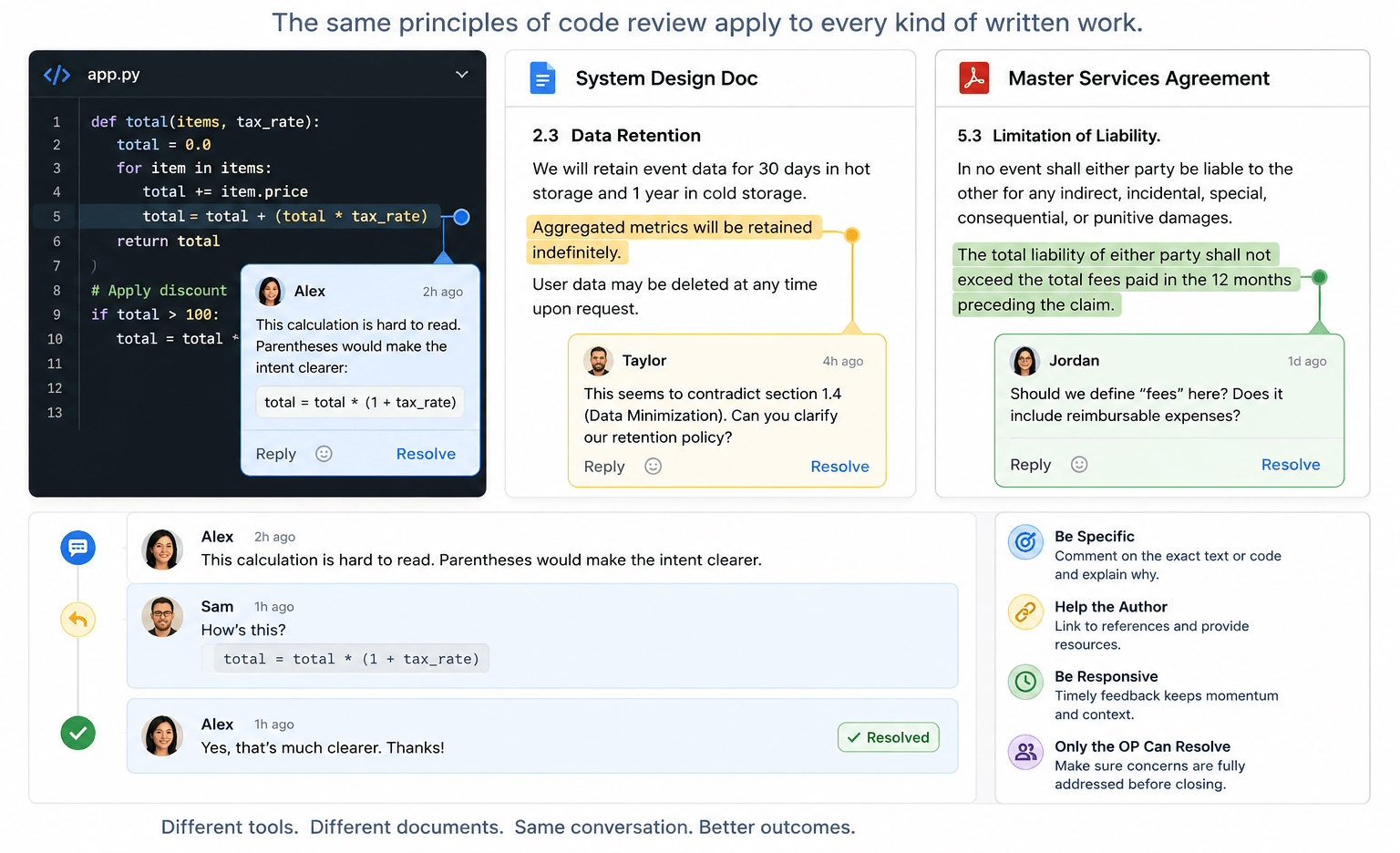
A code review is a conversation: someone asks a question or makes an observation and someone else responds. But it turns out the mechanics of a code review also apply to other types of written feedback. In the past few weeks, I’ve participated in reviewing code, design documents, and contracts. Along the way, I’ve recognized that a few guiding principles can help you get the most benefit out of the review process.

Be Specific

I mean this both in the sense of not being vague (“This seems wrong”) but also not being general. It’s rare that code or prose is so weak it needs to be rewritten from scratch. You almost always have a solid outline and one or more things could stand improvement.

  • In modern source control platforms, you can likely comment on a specific line of code.
  • In Google Docs, Microsoft Word, and such, you generally highlight the text you want to comment on.

Once you’ve picked the code or text to comment on, give specific feedback.

  • “This variable name is inconsistent with our usual style”
  • “I find this hard to read; parentheses would make this calculation clearer”
  • “This sentence lacks the serial comma that is recommended in our style guidelines”
  • “This seems to contradict section 2.3 earlier in the document”

Critique the Work, Not the Author

Good review comments focus on the artifact, not the person.

Weak: “You clearly didn’t think about edge cases here.”

Better: “It’s not clear to me what happens if the input list is empty.”

The distinction matters. The first version invites defensiveness; the second invites collaboration. Remember, the goal is to improve the work, not win the argument.

Help the Author

If there is an external authority (a style guide or RFC or Wikipedia entry) that supports your argument and gives the author resources, link to it. (If no such reference exists, consider if your comment is going to improve the code or text, or just satisfy your own style bias.)

Be Responsive

Distributed teams thrive on the asynchronous nature of cloud-based feedback loops. But the feedback needs to be timely. I’ve come back to a conversation that has languished and wondered, “What was I trying to say here?” Your team may be in different time zones or on different schedules so feedback in minutes or even hours may not be practical. But if your feedback cycle is measured in weeks, you’re probably spending too much time getting back up to speed as you dig in again.

Only the OP Can Resolve a Conversation

Only the original poster knows with confidence that their concern has been addressed. If the reviewer is confused, the author can’t just rewrite it and assume it is now clear! Waiting for the reviewer to acknowledge that their concern has been addressed may be the most important contribution to the success of the review.

Weak

  • Author: Would you look at this?
  • Reviewer: This paragraph is hard for me to follow.
  • Author: I rewrote it. (And resolves the conversation.)

The author has no way to tell if the new text is clear to the reviewer.

Better

  • Author: Would you look at this?
  • Reviewer: This paragraph is hard for me to follow.
  • Author: How’s this?
  • Reviewer: Yes, I understand. Thanks. (And resolves the conversation.)

Challenge: Do you see the bug in the Python code in the image at the top of this post?

 
Leave a comment

Posted by on May 27, 2026 in Uncategorized


Tags: ,

Compounding Interest in UI: Why Seconds Matter at Scale

Making things easy is hard.

But I often tell developers that extra time spent making software easier to use is time well spent. If an hour or two of development saves users 10 seconds thousands of times, the net gain of time spent just grows more and more valuable the longer the software is in use. Not to mention that an attractive, informative, frictionless UI makes a great impression on your user.

So, where can you spend your time to make your UI help your users save time?

Be Consistent

Users come to your software with experience and expectations. They “know” that a magnifying glass indicates search. Without a good reason to do something else, be consistent with industry standards. But if you have reason to be distinctive, at least be consistent across parts of your system.

“Any Standard Is Better Than No Standard”

Be Specific

They say 90% of programming is error handling. (The other 90% is user interface.) A lot of that is defensive programming that keeps your software running in unusual circumstances. But some of those circumstances are not so unusual. And if the program knows something that would help the user, it should be communicated to the user. I’ve been guilty of writing code that handled several errors by responding with a message like “Error: Could not complete operation.” And I’ve been the victim of code like that, too. I ask “Why? What ‘error?'”

Lately, I’ve found AI programming support to be a great help here. Where I may have had code like:

// Validate, then apply change.
if (firstConditionNotMet()
|| secondConditionNotMet()
|| thirdConditionNotMet())
return -1, "Something went wrong."

DoSomething()
return 0, "Success."

I can highlight it or point to it and have an AI coding agent turn it into something like:

if (firstConditionNotMet())
return -1, "Condition 1 not met; unable to apply change."
if (secondConditionNotMet())
return -2, "Condition 2 not met; unable to apply change."
if (thirdConditionNotMet())
return -3, "Condition 3 not met; unable to apply change."
...

The agent often generates better messages than that but just the mechanical restructuring gives me a place to compose better messages. And this code also returns more specific error codes for the calling function to handle.

Let the AI do the grunt work of creating the scaffolding so you can focus on the messages.

Be Supportive

Roughly 5% of the population has “color vision deficiency” and more have some other form of vision impairment. A first draft of a new UI we created recently had state indicated by colored circles:

  • 🟢= all good
  • 🟡= might need attention
  • 🔴= not good

But we heeded the maxim that you should not use only color to convey information in our UI and undertook a refinement. We kept color but added shapes.

  • ✅
  • ⚠️
  • ❌

All convey a positive connotation in two dimensions: shape and color.

And we added a grey circle⚪for when no reliable state information was available. We support colorblind users with shapes but we don’t stop there.

The important word in “don’t use only color to convey information” is “only.” A rich UI has more than one dimension.

Bonus: Be Grammatical

This is more about making a good impression than making the UI easier to use, but it doesn’t hurt to impress your users.

I find a message like “3 change(s) applied” to look unpolished. And it gets worse when you’re dealing with an irregular noun: “3 policy(s) updated.” But the technique of generating specific error messages that was described above can be applied to creating specific success messages. An AI can help you restructure:

msg = "{n} changes applied."

into

switch n {
0: msg = "No changes applied."
1: msg = "1 change applied."
default: msg = "{n} changes applied."
}

Again, let the AI take a crack at it and refine the messages if you need to. (But you might be surprised how well the agent knows plurals.)


Tags: , , ,

Voice Texting Regression in Android Auto

I’m not sure if this is a corollary to or sequel to Better is Worse or Not So Intelligent but it feels a little like both.

Google Assistant in Android Auto couldn’t cope with my contacts. The only way I was able to voice text my wife while driving was to add a nickname to her contact entry and say, “Hey, Google, text my lovely wife.” Since the Gemini “upgrade,” I can’t text her at all.

  • Me: Text my lovely wife.
  • Gemini: Text “Susan Lovey-Jones?”
  • Me: No. Jane Miller.
  • G: Text “Jennifer Miller?”
  • Me: No. Jane Mitchell.
  • G: Text “Jason Mitchell?”
  • Me: Nevermind.

Between trips, added “Spouse” as relationship to her contact.

  • Me: Text my spouse.
  • G: I can’t find a contact for “my spouse.”
  • Me: I have a contact with the nickname “my lovely wife,” text her.

That didn’t work either. I never succeeded.

I’m a little allergic to “new” though I realize change is inevitable. But is it too much to ask that the new system is at least as good as the one it replaces?

(It’s a little ironic that I used Gemini to generate the image at the top of the post. When AI works, it works.)

 
Leave a comment

Posted by on April 7, 2026 in AI


Tags: ,

Storage is Essentially Free!

Twice in the last few days, I ran into low, artificial limits on how much text a website would allow me to enter into a field.

Once upon a time, this was reasonable. Disk was expensive. RAM was expensive. Constraints were real, and tradeoffs were unavoidable.

That time is long past.

Out of curiosity, I asked Gemini to help me research the history of nonvolatile storage costs. This is what I learned:

  • In 1956, an IBM 350 provided about 3.75 MB of nonvolatile storage for $9,200/MB.
  • Today — during a price spike caused by a NAND shortage — a 2 TB SSD costs around $250.

That’s a 99.99999864% reduction in price per megabyte, without adjusting the 1956 price for nearly 70 years of inflation. For all practical purposes, storage is free.

And yet, both places I hit limits this week were meant to hold directions.

In one case, I was updating instructions to cover a scenario that had been missed in the previous version. I couldn’t add the necessary text without hitting the limit. I trimmed the existing content and ended up with something serviceable, but fragile. The very next update will run into the same wall.

This is absurd.

Text (especially text meant to instruct) should be effectively infinite. Modern disks can handle it. Modern memory can handle it. The constraint is not technical; it’s conceptual.

(And don’t get me started on amateurs who think eight characters is enough for a first name, so I end up with mail addressed to “Christop!” See Falsehoods Programmers Believe About Names.)

 
Leave a comment

Posted by on February 10, 2026 in Software techniques


Tags: , , ,

Normalizing Your Way to a Security Breach

When logging into a website recently, I was asked to verify my identity by picking the address I had on file with the business from a list that included other street addresses. Something like:

  1. 741 Juniper Parkway
  2. 59 Hawthorne Circle
  3. 331 Ushers Rd
  4. 82036 Sterling Terrace
  5. 160 Galaxy Way

I bet you could have impersonated me. There’s a flaw in that list. Do you see it?

The address pulled from their records is normalized to USPS guidelines (“Rd” for “Road”) but all the others have the street type spelled out (“Circle,” etc.). This isn’t just a formatting quirk; it’s an information leak. By applying normalization inconsistently, the developers unintentionally disclosed which option was real.

In security, the devil is in the details or, in this case, the abbreviations. Authentication systems live or die on uniformity: inputs must be normalized consistently, or attackers get clues for free. It’s a classic case of why we don’t “roll our own:” it’s incredibly easy to get it 99% right and still be 100% wrong.

 
Leave a comment

Posted by on January 8, 2026 in Cybersecurity


Tags:

DAGs in SQL

What is a DAG and Why Should You Care?

DAG stands for Directed, Acyclic Graph.  It sounds a bit obscure but it has many practical applications, especially in software design.  But what is it?  The first two words are just modifiers so, what is a graph?

Fundamentally, a graph is a mathematical abstraction.  I could tell you it is made up of nodes and edges but that’s still fairly abstract. You can visualize a graph as being islands (the nodes) connected by bridges (the edges), or cities and the roads connecting them.  Indeed, one of the classic software problems, the traveling salesman, is about just such a scene. The salesperson wants to visit their customers on all of the islands without visiting any island (or using any bridge) twice.  Is it possible?  Can you write a program to do it?  Or a program to show it’s not possible?

There are many variations on the problem. What if each bridge had a different toll and the goal is not to avoid repeats but to minimize total tolls paid?

Another interesting variation arises when the bridges or roads allow traffic to pass in only one direction. In the concrete, we recognize this as a one-way street.  In the abstract, it is a directed edge: an edge that can be used to go from A to B but not back from B to A.

A poor traveler with a bad map or a bad sense of direction might set out on a trip across these one-way bridges and come to realize they have been driving in circles (A to B to C and somehow back to A).  A good civil engineer might be able to set the direction of the bridges so that you couldn’t go in circles.  The graph corresponding to these islands and bridges has no cycles, it’s acyclic.

So, a directed, acyclic graph is one where the edges have direction and you can’t return to your starting point following the direction of the edges.

But why should you care?

Graphs are abstract but describe various real-world problems very well.  For example, consider the files and folders (or directories) on your computer.  We’re used to seeing these presented as an outline where you can navigate down from the root of the disk to a folder in the root, to another folder inside that, and so on and so on.  An outline or organization like this is a “tree,” a special type of directed graph where there is only one path from the root to the leaf.  Picture a real tree and you see the same thing: for any leaf, there is only one path from root to trunk to limb to branch to twig to leaf.

For a more complex example, consider trying to classify animals that have frequent contact with people.  We’ll exclude animals seen on safari or in zoos. We can start by dividing them into Farm Animals and Pets.  Horse, pig, chicken: all farm animals. Goldfish, canaries, guinea pigs: all pets. What about dogs? Dogs are great pets but they also are used on farms to herd livestock. So is a dog a farm animal or a pet?  It’s both. You can’t really use a tree to draw these categories but you can use a DAG!  There are two paths from the root to dog: Frequent Contact → Farm Animals → Dog, and Frequent Contact → Pets → Dog.  (We could divide farm animals into food animals and work animals, or pets into cuddly and not cuddly but dogs still fit two categories.)  A dog is not a goldfish or a pig but because going from one category to a subcategory is directional, we’ll never be confused about that.

A Simple DAG Database

Codd and others did a lot of work creating relational databases. Open source tools like MySQL and products like SQL Server have decades or maybe centuries of labor in them to implement those theories. An edge is a relationship between two nodes so why wouldn’t you use a relational database to store it? Why reinvent the wheel?

You might say because node and edge aren’t SQL types but neither are bank account and product, but banking and e-commerce systems certainly use relational databases.

How do we represent a node in SQL? A table, naturally. What columns does the table have?  Names are convenient for people to refer to things but numeric IDs are somewhat better for computers. So, let’s say a node has an ID, a name, and (why not?) a description.

CREATE TABLE [dag].[DagNode](
[ID] [int] IDENTITY(1,1) NOT NULL,
[Name] [nvarchar](50) NOT NULL,
[Description] [nvarchar](250) NULL)

An edge connects two nodes.  The ID we gave nodes gives us an easy way to represent the nodes.  The natural way to present this is a two-column table where each row is two IDs: one for the parent (the source of the edge) and one for the child (the destination of the edge).

CREATE TABLE [dag].[DagEdge](
[ParentID] [int] NOT NULL,
[ChildID] [int] NOT NULL)

Leaves and Referential Integrity

The table creation above omits the referential integrity constraints in my live database. The DagEdge table in my database has foreign key constraints that make sure both IDs refer to an actual node.

But what about leaves? In graph theory, a leaf is a node with only one edge. But that has some limitations in a database. First, the items we’re organizing in a DAG likely have different attributes than the name and description on a node. So, we create a new table for our leaves.

CREATE TABLE [dag].[DagLeaf](
[ID] [int] IDENTITY(1,1) NOT NULL,
[Name] [nvarchar](50) NOT NULL)

But then, we can’t use DagEdge to connect a node to a leaf because of the foreign key on ChildID. So, we create a new table to hold the node/leaf relationships.

CREATE TABLE [dag].[DagNodeLeaf](
[NodeID] [int] NOT NULL,
[LeafID] [int] NOT NULL)

And then add foreign keys to those referring to DagNode and DagLeaf, respectively.

While the DagNode and DagEdge tables are generic, we need a data table and a relation table for every type of data we’re going to organize into DAGs.

Examples

Code supporting this post is available on GitHub. That includes a script to create the tables mentioned above (complete with indices and constraints), a script to populate with some sample data, and a script full of sample queries to show how the data and functions behave. My examples are for SQL Server. Other databases of interest are MySQL and Postgresql. I’m happy to consider pull requests for those or others you may choose to implement.

Thanks

Thanks to CyberReef for allowing me to share this code. Something like it is used in the MobileWall product and related services. Hopefully, I didn’t add too many bugs as I tried to abstract the concepts.

Thanks, also, to my colleagues Carmen, Jessica, and Siva who reviewed the original code and provided valuable feedback.

 
Leave a comment

Posted by on December 4, 2025 in Software techniques


Tags: , , ,

Say It with Fonts

I once worked with a technical writer who had the ironic initials DOC. I was occasionally diverted from my software development tasks to help her with technical documentation and I learned a lot from her.

One of the things I learned was how effective it can be to use a well-selected font to convey information. Any writer (and most readers) see the need for and use of different fonts for headlines vs. body text, and to add emphasis in one way or another. But one thing we did in that environment that has shaped my technical writing ever since is use a special font for user interface text.

As a brief aside, it’s helpful to understand the difference between a typeface and a font.

  • A typeface (sometimes called a font family) is a design for letters, numbers, and symbols that has some unifying design goal. A typeface is often referred to by name. I grew up with Helvetica. All the cool kids are using Aptos now. You’d recognize Impact as the typeface used for text over photos in memes, even if you didn’t know the name. Other examples are Courier and Bookman.
  • A font is a typeface with specific properties like height (usually in points), weight (light, normal, bold), style (italic, roman), and sometimes width.

Thus the font “Courier, 12 pt. bold” is a 12-point-high, bold rendering of the Courier typeface.

Bonus fact: in typography, “roman” generally means upright. That is in contrast to “italic” (or oblique) text, which leans to the right. (Confusingly, Times New Roman is a typeface and you can certainly use Times New Roman, italic as a font.)

Back to using fonts in technical documentation; Unlike content in newspapers and novels, technical documentation talks a lot about things you see on the screen and things you type in response. Often user input is rendered in a monospace typeface, one where every character has the same width. Many systems have good support for this. A common idiom for marking user input is with backticks (`). Markdown does this, GitHub comments, and even recent versions of Outlook Web Access implement it. (If you work in raw HTML, you can think of the backticks like <code> tags.) A common style for this is to render the text between the backticks in monospace (often Courier), one point size smaller than the surrounding text, and bold. With this convention, `this is user input` is rendered something like this is user input.

The innovation I learned from DOC is to also use a specific font for user interface text. The font needs to be different enough from the surrounding text to stand out but not so different that it’s unattractive. The general rule I use is: a narrow version of the body type, one point size smaller, and bold. In modern Microsoft Word, the body type is Aptos 12 pt. so my UI text is Aptos Narrow, 11 pt., bold. This might look like “Type a value in the Username field.”

Creating a UI Text Style

I find it strange that I have never found a system that has this built in. But I have developed some workarounds.

Trac

When I first worked with Trac, I added a macro that added UI text formatting. I wanted something easy to type but with a sort of “quoting” vibe (like backticks are backward single quotes). I settled on double less than (<<) and double greater than (>>), which I intended to be reminiscent of guillemets (ÂŤ, Âť). With this convention, “Type a value in the <<Username>> field” is rendered like the last example. I still use this nearly every day.

Desktop Microsoft Word

In Microsoft Word, you don’t need to write any Python to create new style.

  1. Find Styles in the Home ribbon.
    Styles section of Home ribbon in Microsoft Word
  2. Click the button on the right to expand the style box.
    Expanded Styles box in Microsoft Word
  3. Click Create a Style to open the Create New Style from Formatting form.
    Simple Create New Style from Formatting form in Microsoft Word
  4. Click Modify… to show more options in the form.
    Complete Create New Style from Formatting form in Microsoft Word
    • Enter a name of your choice.
    • Pick Character as Style type.
    • Pick Default Paragraph Font for Style based on.
    • Pick a font and size as appropriate. (Aptos Narrow works for recent versions of Microsoft Word where the default font is Aptos.)
    • Pick other options as desired.
  5. Click OK.

Now your new style is available to apply to any text in your document.

Microsoft Word Online

It’s not quite that easy in Office 365 (or whatever they are calling it this week). The online versions of Microsoft Office tools don’t have all the features of the desktop versions. However, the online and desktop versions work well together so you can add a style to an online document with the desktop tool. (No doubt this depends somewhat on what licenses you have and other details but this works for me.)

  1. In the online version of Word, drop down the Editing button and pick Open in DesktopEditing menu in Microsoft Word online
  2. When prompted, confirm you want to Open Word.
    Confirmation dialog to open Word on the desktop
  3. Create the style as above (or do whatever other editing you want to do).
  4. Close the desktop app (that’s all, just close it!).
  5. Click Continue Here in the online app
    Confirmation dialog to continue editing online
 
Leave a comment

Posted by on November 12, 2025 in Uncategorized


Tags:

Understanding Mobile Device Enrollment

They say there are only two hard problems in computer science:

  1. Naming things
  2. Invalidating cache contents
  3. Off-by-one errors

I was reminded of the first problem as my company recently struggled to communicate clearly among ourselves and with vendors about the types of device enrollment in Mobile Device Management (MDM) systems.

I couldn’t find any industry-standard terms that applied here. If I’m wrong, I’d be happy to hear about it. If I’m right, maybe others will find the following names and definitions useful.

Enrollment Classes 

For enterprises, Apple Business Manager, Android Zero Touch Enrollment, and Samsung Knox are reliable, large-scale methods of enrolling devices in MDM management.  However, only authorized resellers can add devices to those systems.  A business buying a fleet of phones from a carrier or major retailer can rely on the reseller setting their phone up for easy management.   

However, an MVNO or other service provider cannot always establish the “chain of custody” necessary to prove ownership and get devices into those systems.  There are other methods, but they have limitations. Apple and Google have different procedures and names for their device enrollment processes. Platform-agnostic terminology can make it easier to talk about the end state of an enrolled device regardless of platform. Toward that end, we defined three classes of enrollment. 

  • Class A enrollment is the most secure and permanent. The MDM has nearly complete control of the device and after a factory reset the device will be automatically reenrolled in the MDM which can reestablish control. 
  • Class B enrollment is nearly as good.  The MDM has nearly complete control of the device, but a factory reset will disconnect the device from the MDM and require manual intervention to reenroll the device. 
  • Class C enrollment is useful but fairly weak. The MDM can control and monitor some aspects of the device, but the device holder has the ability to bypass the MDM controls and make changes that put the device or its user at risk. 

Class A 

Class A enrollment requires a device to be added to a zero-touch enrollment platform: Apple Business Manager (for iOS), Knox Mobile Enrollment (for Samsung), or Zero-Touch Enrollment (for Android, including Samsung). 

The zero-touch enrollment platforms are best suited for organizations managing large fleets of devices.  While some exceptions can be managed with effort, the usual path is that the organization buys devices from an “authorized reseller” who adds the devices to the platform for the organization. 

  • Advantages: Class A is sticky (even a factory reset doesn’t remove the device from the MDM) and easy (the devices are put in the portal by the reseller, and the organization doesn’t have to do anything to enroll them). 
  • Disadvantage: Class A is very difficult to add to existing devices. 

Class B 

Class B enrollment can be done to existing devices without concern for the zero-touch enrollment platforms. 

This is useful for organizations trying to onboard existing devices while maintaining tight control.  A Class B enrollment leaves the device “owned” by the MDM so it can enforce always-on VPN and other privileged policies. 

  • Advantages: Class B does not require the devices to be in a zero-touch enrollment platform, and it allows privileged policies to be enforced. 
  • Disadvantages: Class B requires touching every device, requires the device to be factory reset (“wiped”), and the device does not automatically reenroll after another factory reset. 

Class C 

Class C enrollment can be done to existing devices without the need to factory reset them. 

This can be useful for adding management to deployed devices.  However, because the device is not “owned” by the MDM, privileged policies like always-on VPN cannot be enforced. 

  • Advantage: Class C does not require a factory reset. 
  • Disadvantage: Class C does not prevent the user from disabling important policies like always-on VPN, or even from uninstalling the MDM client.  
 
Leave a comment

Posted by on November 5, 2025 in Definitions


Tags:

Test 25x Faster!

My very first professional programming project was debugging and completing a lab automation system written in BASIC. It ran on a desktop HP computer and controlled instruments and equipment through GPIB. The challenge was that it controlled experiments in “real time,” not the “really fast response” that “real time” often means, but rather by the clock. It would do something, wait a minute or 15 minutes or something, do the next thing, wait a while, etc. The system started with bugs fairly early in the run of the experiment so I could start the program running, take a short break, and come back to find the program had crashed. I’d figure out what went wrong, fix it, and start the program again. But this time the program didn’t crash in the code I’d just fixed; it ran longer and crashed in 10 minutes instead of the previous five. Do you see where this is going? Eventually, I had to wait hours for the next crash and the better the code got, the longer I had to wait to fix the next issue!

My current team also does work that has to happen by the clock. The software counts some things and takes certain actions at certain limits. The counts reset at the end of the period which might be an hour, a day, a week, or a month. We can fake the data that causes the counts to change, but we don’t want to wait around to see if a monthly action works as it should. And messing with the system clock to fool the software is messy. Fortunately, one of the most interesting aspects of the system (one that we need to test carefully and repeatedly to avoid regression) involves when things are supposed to happen at different time scales. Do things that happen at a small time scale interact appropriately with things that happen at a larger time scale?

Once we were confident that the system properly recognized the end of an hour, day, etc. (in core code that was unlikely to change), we sought a way to speed up testing of other features so we didn’t have a month-long test in our release process. What we realized is that an hour is 1/24 of a day and a day is around 1/30 of a month. So if our production system is primarily concerned with days and months, we can take production configuration, change days to hours and months to days, and test in roughly 1/25 of the time. An overnight test with this substitution effectively tests two weeks (14-18 days) of real execution that straddles a month boundary. A weekend-long test covers 3-4 months of real world cycling through the logic in the system! And we don’t have to disable NTP or play any other shenanigans with the system time.

Just don’t ask me what happens around Daylight Saving Time transitions.

 
Leave a comment

Posted by on June 17, 2024 in Uncategorized


Tags: , ,

Everything Old is New Again

Imagine a data processing system that takes advantage of local computing resources to provide a rich user experience and robust data validation while offloading a central computing system. It presents complex forms composed of smart fields that prevent entry of invalid data. Much of the validation is done locally, based on attributes applied to the fields to provide prompt feedback. However, when necessary, input can be validated against lists of values retrieved from the central system. When the form is complete, the user submits the data to the central system as a package that gets processed all at once before returning a success indicator or a failure indicator with a possible list of error messages to guide revising the data for resubmission.

Some readers will think it obvious that the data processing system is the World Wide Web. HTML forms — especially when souped up with modern web frameworks — support complex data validation and submit fields to a web server to update centrally stored data. If you’ve ever bought anything from an eCommerce site, you’ve used this technology.

However, as I was writing the first paragraph, I was not thinking of PCs running web browsers and data centers full of web servers, I was describing mainframes and their terminals. Undoubtedly, the web browser provides a more rich and responsive user experience than a 3270 terminal (which, among other things, lacked graphics), but diagrams of communication between parts of the old and new systems are identical in all but details.

I can’t say if the designers of HTML modeled their form system on mainframe data entry but it kind of looks like it. If they didn’t, they might have made their job easier had they done so. The suggestion that a programmer should not reinvent the wheel is often interpreted as applying to recreating other contemporary technology with similar features. However, it also means being aware of the history of computer science and technology in sufficient detail that you can learn from historical systems to make your job easier and your system stronger.

 
Leave a comment

Posted by on April 29, 2024 in Uncategorized