RSS

Good Backups Remove Intrinsic Value

A man sitting at a wooden table, examining a tablet while a broken smartphone with a shattered screen lies next to him. There are books and a charging cable on the table, and a window with natural light in the background.

I was thinking recently about how I view my phone and my tablet differently. Both are Android devices that I use to handle email, browse the web, and read. However, if I lost my tablet, I’d just order a new one (and get the benefits of a fresh battery and updated technology) whereas losing my phone would be much more painful. I came to characterize the difference as how much intrinsic value each device had, essentially no intrinsic value beyond the hardware itself.

My phone, by virtue of the irreplaceable data stored on it, has a fair bit of intrinsic value. Photos accumulate daily, personal settings build up over time, and while migration to a new phone is manageable when both devices are in hand, starting from scratch after a total loss is tedious.

In contrast, I use my tablet only to read (ebooks that are synchronized from the source as needed), to browse the web (where everything I see is in the cloud), and to read email (also in the cloud). I sometimes use Google Messages from my tablet but there is still no meaningful use of local storage.

My phone has intrinsic value because it holds unsynced data, settings, and personal history. My tablet has only extrinsic value; it enables things but losing it is almost a non-event. A friend once told me about having his Mac stolen. The thieves were wily enough not to turn it on in reach of Wi-Fi, so the device location service never helped recover it. But he bought a new computer, signed in, and his entire environment was restored to the new device. The effective backup of his lost device meant that it had essentially no intrinsic value.

This principle extends beyond mobile devices and cloud subscriptions. It’s the reason I maintain a dedicated backup server at home. Whether it’s cloud sync for a tablet or automated local snapshots for home computers, the goal is the same: to shift value away from fragile physical boxes and into resilient, recoverable systems and render the physical hardware readily replacable.

There are two kinds of people in the world:

  1. Those who have lost data
  2. Those who will lose data

An effective backup makes the next loss less painful than it would otherwise be.

 
Leave a comment

Posted by on October 6, 2026 in Uncategorized


Tags: , ,

Best Practices for Easy Bulk Data Configuration

A warehouse scene featuring a forklift driver transporting a wooden crate labeled 'DATA'. A woman in a blue jumpsuit stands with a clipboard, checking items off a list. The background shows shelves of boxes and a rules sign on the wall.

Our customer-facing portal and some of our internal tools support bulk configuration via file upload. Over time, our experience has removed a lot of friction from the process making it a great enabler of efficient workflows. A few rules guide our work.

Meet Your Users Where They Are

Of the myriad file formats that can be used for structured data (XML, JSON, CSV, XLSX), some are well-suited for scripts and others are more human-friendly. In business, the universal editor for tabular data is Microsoft Excel. Libraries for C#, Python, and Java (among many other languages) make reading (and usually writing) Excel spreadsheets straightforward.

CSV is an important second option, especially in Linux-heavy environments. The files can be edited in the user’s text editor of choice and tools like CSV Kit allow scripting to manipulate the data. Of course CSV lacks formatting and calculations, but bulk configuration rarely has a need for those.

Rule 1: Support native Excel (.xlsx) first, and offer CSV as a lightweight alternative.

Tell Them What You Expect

It’s a truism that users don’t read documentation. You can write pages describing your upload requirements, but showing is better than telling. Right next to every upload button, provide a one-click download for a sample template with headers your system expects.

Rule 2: Provide a downloadable template at the point of upload.

Ignore What You Don’t Care About

Postel’s Law tells us to be liberal in what we accept. If an uploaded file has an extra column you don’t recognize, is that an error? Not really, you can just ignore it. Don’t assume your system is the only destination for the file. Similarly, ignore case when handling column headers; Username, username, and USERNAME should all map to the same field.

Rule 3: Be permissive with extra data and case variation in headers.

Enforce What You Do Care About

Validating each field in each row is standard practice. But bulk data processing must also have batch-level validation. Before you commit any data from an uploaded file, validate the entire batch, including across rows and against existing data. It’s easy to make sure every value in the batch is unique where necessary. But every value in that column must also be distinct from every value in the database you’re updating. An important edge case arises when swapping two values: the first row uses a value already stored in the database but when the whole batch is processed another row updates the database so the conflict no longer exists. Make sure your upload can handle swapping unique values.

Rule 4: Validate the entire payload against the target state before executing any writes.

Give Specific Feedback

If the user uploads a file of 100 rows, “Update failed” is not useful feedback. “Username ‘asdf$1234’ on row 4 is invalid; usernames cannot include $ or @” tells the user what they did wrong, where, and how to fix it.

Rule 5: Point directly to the row, column, and business logic error.

Give Exhaustive Feedback

It’s incredibly inefficient to stop at the first row with invalid data and make the user iterate until all the problems are fixed. Validation should process all the rows and report all the problems it finds. In the user interface, make it easy to copy that list of problems to another window for reference as the user works through addressing them.

Rule 6: Report every error in the file at once.

Data Rows Start at 2

Programmers may start counting at zero but normal humans do not. Bulk uploads have a header row and data starts at row 2. Provide feedback map internal indices to something natural to the user as seen in their editor.

Rule 7: Translate internal 0-indexed arrays to match the spreadsheet UI.

Frictionless Uploads Build Trust

File uploads are often treated as an unglamorous utility, but for power users, they are a primary interface to your system. Every uninformative error message, rigid schema demand, or broken row index adds unnecessary friction to their workday. By treating bulk upload as a core product feature (one that is forgiving on input and explicit on feedback), you turn a potentially frustrating task into a reliable, efficient workflow.

 
Leave a comment

Posted by on September 22, 2026 in Software techniques


Tags: , ,

Small Changes and the Art of Non-Destructive Review

Two landscapers discussing a planting plan in a garden, one holding a blueprint and pointing to a marked spot on the grass, while the other holds a shovel and gives a thumbs up next to a potted plant.

I think we’ve all experienced a system failure that occurs when we are sure nothing changed. But aside from that, it feels true that the smaller the change you make, the better are the chances that it will have no negative repercussions. Having someone review your proposed change improves its chances of success. And small changes are easier to review with confidence than big ones.

When doing file maintenance on a Linux system, I often end up needing to remove some files:

rm <some_pattern>

How sure am I that will do what I intend? Fortunately, listing and removing files in Linux are very close in syntax. I almost invariably precede an rm with a pattern by ls with the same pattern:

ls <some_pattern>

I review the output, convince myself only the intended files are affected, then use the up arrow key to recall the ls, change ls to rm, and press return to execute. I do not retype the pattern!

I can then press up twice and re-execute the ls to verify the files are gone.

Happily, SQL SELECT and DELETE have a similar relationship: the first finds and the second destroys. If I think I want to do:

DELETE FROM my_table WHERE <some_clause>

I generally first do:

SELECT * FROM my_table WHERE <some_clause>

Then, when I’m confident it selects the right rows, I edit the command changing only SELECT * to DELETE and nothing else and then execute it.

It’s less helpful that SQL SELECT and UPDATE have somewhat different forms so if I want to change data, I can’t just write a query and make a simple edit to update the same rows. At least not in an obvious way.

Recently, someone asked me to review their plan to update some data. They offered a fairly complex SELECT that identified the relevant rows and showed the data that needed to be changed. But then they offered a different query to find rows to update. I spent a few minutes looking at the two queries and decided I could not be confident they found and changed the same rows. A common table expression turned out to be the solution.

The query to find the relevant rows ended up something like:

WITH Changes AS (
-- a complex query
)
SELECT t.OldValue, c.NewValue
FROM table AS t
JOIN Changes AS c
ON c.ID = t.ID;

Of course, we could have listed more values from t if they were helpful but this was enough to

  1. Give the developer something safe to iterate on while developing the query logic
  2. Give me a harmless query to review carefully and run as needed to raise my confidence

Once we both felt that the complex logic in the CTE was correct, they had only to change:

SELECT t.OldValue, c.NewValue

to

UPDATE t SET OldValue = cNewValue

That is an almost trivial change that is easy to review. The complex query could have been tens of lines but it didn’t need to be reviewed again because it didn’t change.

They changed it, I reviewed it, they ran it. It did exactly what we wanted.

We often think of database safety in terms of transactions, permissions, or backups. But human-centric safety is just as critical. Good software engineering requires writing code that is easy for a person to read, review, and trust.

If a peer review requires holding two separate queries in your head to verify they target the exact same rows, the process itself invites error. Wrapping the selection logic in a CTE bridges the gap between shell simplicity and SQL structure: it lets you preview the precise impact before swapping out the verb, giving both author and reviewer total confidence.

Small, atomic changes make code easier to write, safer to review, and far less stressful to execute.

 
Leave a comment

Posted by on September 15, 2026 in Software techniques


Tags: , ,

Code of Theseus

A historical scene depicting shipbuilders working on a wooden boat at a bustling harbor, with a man sitting contemplatively nearby. The backdrop features a picturesque ancient city with classical architecture and ships in the water.

A recent post on Hack-a-Day about having an AI agent refine a sketch of a script into something production-ready somehow made me think of the Ship of Theseus. If you write the basic algorithm and initial proof of concept but an AI agent optimizes and adds error handling and more, is it still yours?

The script writer had a goal and got something working in short order but, oh, the details! Programs that persist (or crash!), servers that are unavailable or give inconsistent answers. If 90% of programming is error handling, who really wants to write that 90%? (The other 90%, of course, is user interface.)

I’ve written about having an agent do the grunt work and that’s exactly what this developer did. He had the agent fill in error handling and flesh out some features.

This is a good example of how I think these tools work best. The AI handles the implementation, edge cases, tests, and documentation, while the human provides design input and flags anything awkward or that doesn’t fit the intended experience.

This is a workflow I’ve found myself using a lot recently. I sketch something — in a script or simple program, or even as a brief requirements statement — and let the AI build it out. We work together to refine it. Sometimes it’s a realSometimes the agent goes off for a while and comes back with something to review. I look at it, use it a little, offer some critique or suggestion, and we repeat until done.

Come to think of it, this is similar to how I have often worked with interns or junior developers: I give direction and feedback but type a minority of the lines, if any at all. (In process as in product, everything old is new again.)

I’m happy for the help. It lets me concentrate on the big picture. But is the result my work? I’ll leave that to the philosophers.

 
Leave a comment

Posted by on September 8, 2026 in AI, Software techniques


Tags: ,

Looking Outside Your Domain for the Simple Fix

Engineers (including software engineers) need to be both curious and observant. You never know where the solution to your problem will come from but it often comes from outside your domain. I’ve written before about how data entry on the web has close parallels to mainframe remote job entry.

I recently bought a robot vacuum for my pool. It’s not “smart.” It doesn’t see debris and navigate to pick it up. It doesn’t map my pool and execute a regular pattern. It just does a Brownian walk around the pool and when it gets to an obstacle (a corner or the water line) it backs off, turns, and starts forward again.

But like many digital devices, my robot is not truly random. Would that it were. Rather it seems to favor turning in one direction. After an hour or two, the cord is twisted and tangled and I have to spend 10-15 minutes twisting it the other way before restarting or removing the vacuum. I almost wonder if it’s a true labor saver. (Almost!)

One solution to this would be for the robot to randomly choose its turning direction on every turn. But as noted, digital devices often struggle with randomness, and even true randomness could still result in a series of identical turns. However, my experience in the kitchen suggested a different idea. I’ve noticed that every time my microwave starts, the platter seems to turn in the opposite direction from the previous run.

Applying this to my vacuum, if every time it turned, it turned in the opposite direction from the last time the twists in the cord would be much less likely to accumulate. And left, then right, then left, then right is an ideal application for a digital device: keep a “turn direction” bit, 0 means turn left, 1 means turn right, and flip on each turn. Voila!

So, experience in the kitchen designed a solution for my problem in the yard. Stay curious and stay observant: it’ll make you a better developer.


Tags:

Good Reviews Are Conversations

   Q: How do you know if a programmer is an extrovert?

   A: They look at your shoes when they talk to you.

I can say that, I’m a programmer. And an introvert. 😉 But that’s not the type of conversation I want to write about.

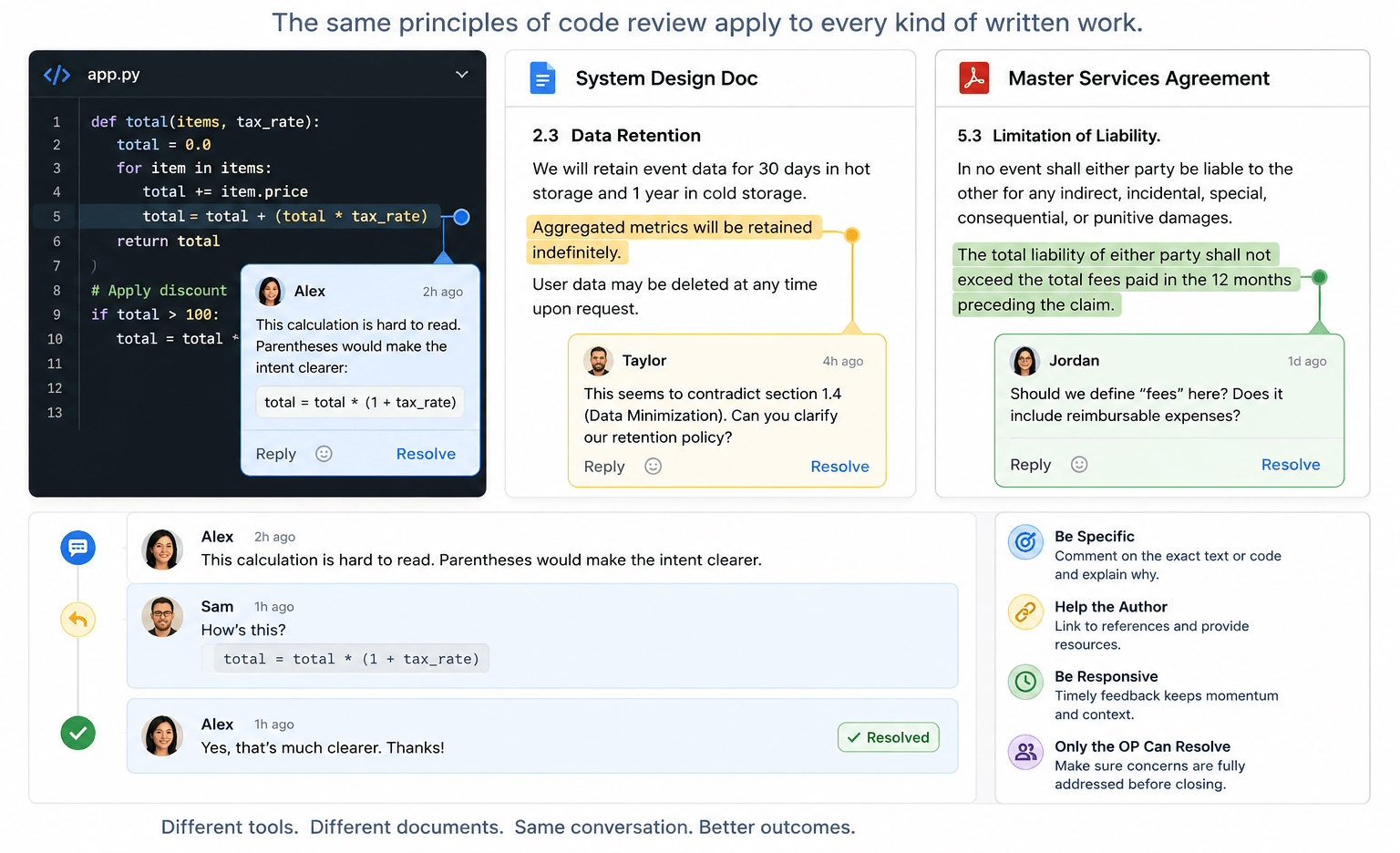
A code review is a conversation: someone asks a question or makes an observation and someone else responds. But it turns out the mechanics of a code review also apply to other types of written feedback. In the past few weeks, I’ve participated in reviewing code, design documents, and contracts. Along the way, I’ve recognized that a few guiding principles can help you get the most benefit out of the review process.

Be Specific

I mean this both in the sense of not being vague (“This seems wrong”) but also not being general. It’s rare that code or prose is so weak it needs to be rewritten from scratch. You almost always have a solid outline and one or more things could stand improvement.

  • In modern source control platforms, you can likely comment on a specific line of code.
  • In Google Docs, Microsoft Word, and such, you generally highlight the text you want to comment on.

Once you’ve picked the code or text to comment on, give specific feedback.

  • “This variable name is inconsistent with our usual style”
  • “I find this hard to read; parentheses would make this calculation clearer”
  • “This sentence lacks the serial comma that is recommended in our style guidelines”
  • “This seems to contradict section 2.3 earlier in the document”

Critique the Work, Not the Author

Good review comments focus on the artifact, not the person.

Weak: “You clearly didn’t think about edge cases here.”

Better: “It’s not clear to me what happens if the input list is empty.”

The distinction matters. The first version invites defensiveness; the second invites collaboration. Remember, the goal is to improve the work, not win the argument.

Help the Author

If there is an external authority (a style guide or RFC or Wikipedia entry) that supports your argument and gives the author resources, link to it. (If no such reference exists, consider if your comment is going to improve the code or text, or just satisfy your own style bias.)

Be Responsive

Distributed teams thrive on the asynchronous nature of cloud-based feedback loops. But the feedback needs to be timely. I’ve come back to a conversation that has languished and wondered, “What was I trying to say here?” Your team may be in different time zones or on different schedules so feedback in minutes or even hours may not be practical. But if your feedback cycle is measured in weeks, you’re probably spending too much time getting back up to speed as you dig in again.

Only the OP Can Resolve a Conversation

Only the original poster knows with confidence that their concern has been addressed. If the reviewer is confused, the author can’t just rewrite it and assume it is now clear! Waiting for the reviewer to acknowledge that their concern has been addressed may be the most important contribution to the success of the review.

Weak

  • Author: Would you look at this?
  • Reviewer: This paragraph is hard for me to follow.
  • Author: I rewrote it. (And resolves the conversation.)

The author has no way to tell if the new text is clear to the reviewer.

Better

  • Author: Would you look at this?
  • Reviewer: This paragraph is hard for me to follow.
  • Author: How’s this?
  • Reviewer: Yes, I understand. Thanks. (And resolves the conversation.)

Challenge: Do you see the bug in the Python code in the image at the top of this post?

 
Leave a comment

Posted by on May 27, 2026 in Uncategorized


Tags: ,

Compounding Interest in UI: Why Seconds Matter at Scale

Making things easy is hard.

But I often tell developers that extra time spent making software easier to use is time well spent. If an hour or two of development saves users 10 seconds thousands of times, the net gain of time spent just grows more and more valuable the longer the software is in use. Not to mention that an attractive, informative, frictionless UI makes a great impression on your user.

So, where can you spend your time to make your UI help your users save time?

Be Consistent

Users come to your software with experience and expectations. They “know” that a magnifying glass indicates search. Without a good reason to do something else, be consistent with industry standards. But if you have reason to be distinctive, at least be consistent across parts of your system.

“Any Standard Is Better Than No Standard”

Be Specific

They say 90% of programming is error handling. (The other 90% is user interface.) A lot of that is defensive programming that keeps your software running in unusual circumstances. But some of those circumstances are not so unusual. And if the program knows something that would help the user, it should be communicated to the user. I’ve been guilty of writing code that handled several errors by responding with a message like “Error: Could not complete operation.” And I’ve been the victim of code like that, too. I ask “Why? What ‘error?'”

Lately, I’ve found AI programming support to be a great help here. Where I may have had code like:

// Validate, then apply change.
if (firstConditionNotMet()
|| secondConditionNotMet()
|| thirdConditionNotMet())
return -1, "Something went wrong."

DoSomething()
return 0, "Success."

I can highlight it or point to it and have an AI coding agent turn it into something like:

if (firstConditionNotMet())
return -1, "Condition 1 not met; unable to apply change."
if (secondConditionNotMet())
return -2, "Condition 2 not met; unable to apply change."
if (thirdConditionNotMet())
return -3, "Condition 3 not met; unable to apply change."
...

The agent often generates better messages than that but just the mechanical restructuring gives me a place to compose better messages. And this code also returns more specific error codes for the calling function to handle.

Let the AI do the grunt work of creating the scaffolding so you can focus on the messages.

Be Supportive

Roughly 5% of the population has “color vision deficiency” and more have some other form of vision impairment. A first draft of a new UI we created recently had state indicated by colored circles:

  • 🟢= all good
  • 🟡= might need attention
  • 🔴= not good

But we heeded the maxim that you should not use only color to convey information in our UI and undertook a refinement. We kept color but added shapes.

  • ✅
  • ⚠️
  • ❌

All convey a positive connotation in two dimensions: shape and color.

And we added a grey circle⚪for when no reliable state information was available. We support colorblind users with shapes but we don’t stop there.

The important word in “don’t use only color to convey information” is “only.” A rich UI has more than one dimension.

Bonus: Be Grammatical

This is more about making a good impression than making the UI easier to use, but it doesn’t hurt to impress your users.

I find a message like “3 change(s) applied” to look unpolished. And it gets worse when you’re dealing with an irregular noun: “3 policy(s) updated.” But the technique of generating specific error messages that was described above can be applied to creating specific success messages. An AI can help you restructure:

msg = "{n} changes applied."

into

switch n {
0: msg = "No changes applied."
1: msg = "1 change applied."
default: msg = "{n} changes applied."
}

Again, let the AI take a crack at it and refine the messages if you need to. (But you might be surprised how well the agent knows plurals.)

 
1 Comment

Posted by on May 5, 2026 in AI, Software techniques


Tags: , , ,

Voice Texting Regression in Android Auto

I’m not sure if this is a corollary to or sequel to Better is Worse or Not So Intelligent but it feels a little like both.

Google Assistant in Android Auto couldn’t cope with my contacts. The only way I was able to voice text my wife while driving was to add a nickname to her contact entry and say, “Hey, Google, text my lovely wife.” Since the Gemini “upgrade,” I can’t text her at all.

  • Me: Text my lovely wife.
  • Gemini: Text “Susan Lovey-Jones?”
  • Me: No. Jane Miller.
  • G: Text “Jennifer Miller?”
  • Me: No. Jane Mitchell.
  • G: Text “Jason Mitchell?”
  • Me: Nevermind.

Between trips, added “Spouse” as relationship to her contact.

  • Me: Text my spouse.
  • G: I can’t find a contact for “my spouse.”
  • Me: I have a contact with the nickname “my lovely wife,” text her.

That didn’t work either. I never succeeded.

I’m a little allergic to “new” though I realize change is inevitable. But is it too much to ask that the new system is at least as good as the one it replaces?

(It’s a little ironic that I used Gemini to generate the image at the top of the post. When AI works, it works.)

 
Leave a comment

Posted by on April 7, 2026 in AI


Tags: ,

Storage is Essentially Free!

Twice in the last few days, I ran into low, artificial limits on how much text a website would allow me to enter into a field.

Once upon a time, this was reasonable. Disk was expensive. RAM was expensive. Constraints were real, and tradeoffs were unavoidable.

That time is long past.

Out of curiosity, I asked Gemini to help me research the history of nonvolatile storage costs. This is what I learned:

  • In 1956, an IBM 350 provided about 3.75 MB of nonvolatile storage for $9,200/MB.
  • Today — during a price spike caused by a NAND shortage — a 2 TB SSD costs around $250.

That’s a 99.99999864% reduction in price per megabyte, without adjusting the 1956 price for nearly 70 years of inflation. For all practical purposes, storage is free.

And yet, both places I hit limits this week were meant to hold directions.

In one case, I was updating instructions to cover a scenario that had been missed in the previous version. I couldn’t add the necessary text without hitting the limit. I trimmed the existing content and ended up with something serviceable, but fragile. The very next update will run into the same wall.

This is absurd.

Text (especially text meant to instruct) should be effectively infinite. Modern disks can handle it. Modern memory can handle it. The constraint is not technical; it’s conceptual.

(And don’t get me started on amateurs who think eight characters is enough for a first name, so I end up with mail addressed to “Christop!” See Falsehoods Programmers Believe About Names.)

 
Leave a comment

Posted by on February 10, 2026 in Software techniques


Tags: , , ,

Normalizing Your Way to a Security Breach

When logging into a website recently, I was asked to verify my identity by picking the address I had on file with the business from a list that included other street addresses. Something like:

  1. 741 Juniper Parkway
  2. 59 Hawthorne Circle
  3. 331 Ushers Rd
  4. 82036 Sterling Terrace
  5. 160 Galaxy Way

I bet you could have impersonated me. There’s a flaw in that list. Do you see it?

The address pulled from their records is normalized to USPS guidelines (“Rd” for “Road”) but all the others have the street type spelled out (“Circle,” etc.). This isn’t just a formatting quirk; it’s an information leak. By applying normalization inconsistently, the developers unintentionally disclosed which option was real.

In security, the devil is in the details or, in this case, the abbreviations. Authentication systems live or die on uniformity: inputs must be normalized consistently, or attackers get clues for free. It’s a classic case of why we don’t “roll our own:” it’s incredibly easy to get it 99% right and still be 100% wrong.

 
Leave a comment

Posted by on January 8, 2026 in Cybersecurity


Tags: