RSS

Author Archives: Christopher Nelson

Unknown's avatar

About Christopher Nelson

Professional Software Engineer interested in software quality and usability.

Encryption (Sort of) Explained

When I discussed Password Policies, I talked about the one-way encryption used to store passwords but more generally you want to encrypt something to make it private and later decrypt it to use it. Here I’ll try to give a basic idea of how that works. Again the real math is hard but a useful understanding is not.

Substitution

A very simple example of protecting a message is a substitution cipher where each letter of a message is replaced by a different letter using a plan agreed upon by the sender and receiver of the message. You’ll find substitution in the secret decoder rings of yore and the rot13 (rotate 13) algorithm. In rot13, every letter is replaced by the one 13 letters later in the alphabet (wrapping around to A from the second half of the alphabet). A becomes N, B becomes O, and P becomes C.

A message enciphered with rot13 can be decoded either by applying rot13 again or by reversing it.

Encode: BLOCK + 13 = OYBPX
Reverse: OYBPX – 13 = BLOCK
Encode: OYBPX + 13 = BLOCK

Such simple encoding is easy to understand and implement and the message doesn’t change size when it is encoded, but substitution ciphers are easily broken based on the well-known frequency of letters in English text. Given a message of any significant size, we can look for the most frequent letter and be fairly sure that it is a substitute for E. T is the next most common letter. Then if we see “TXE” we can guess that X represents H. Clearly we need something stronger to keep your online banking safe and private.

How Keys Work

If you think of a key as something that gives you access, a computer password is a sort of key. Unfortunately, passwords are the skeleton keys of computer security. It is possible to make passwords long and complex, but then they are hard to remember or type. However, computers often excel at things people don’t do well and remembering long, meaningless strings of characters is one of those tasks. The state of the art in encryption is called Public Key Infrastructure and it takes advantage of this strength of computers.

The software that secures your session with your bank’s website manipulates very long keys to encrypt and decrypt the data flowing between your computer and the bank. The keys look something like:

ssh-rsa AAAAB3NzaC1yc2EAAAADAQABAAABAQCZ2R9o2S7n86yV4X23yG3gD/xWzZ0FdCNHPmhogm
Lh+/batLhfkXBZxR7bUrjVe0Lwr+JrdT0czQp6DGZLhjiGsAihKFTbvvyowFoLLcH34/KisTTj6k1m
BFNU/oAUyHd74SZdmnaU3qnZ6QmYylxavN67TWjcPuzepiGwvmv3dpXrPr76qKRG/+huac9fZ04Ld5
tZRUkoILOPWh5+WJ4Ak7mx5652QVWT2MloGxW+qHr3RCoUEAklXdUSkC8HsOv0np8Q4NK7UFC+l+yh
t37+AL8IOe7j9HiPovoY+OVB99F472QywjrOiDzHR27dgs8YrYJ5QqGckd8v2McS2i83 chris@chris-XPS-99-1234

Keys used in this way are generated as a pair, one which is kept private and one which can be freely shared. In the rot13 example above, the same “key” (13) was used to encode and decode. But what if you used 12 to encode and told your friend to use 14 to decode. C + 12 = O and O + 14 (wrapped around at Z) = C.

Public/private key pairs are useful because the math involved in creating and using them makes them only work going forward.

  • With a rot13-like encoding, there are two keys that may be used to decode a message (you can subtract the encoding key or add the decoding key). Public/private key pairs don’t work like that; a message encoded with the private key can only be decoded with the public key. Knowing the private key does not allow you to reverse the encryption.
  • With rot13-like encoding, you know that the two keys must add up to 26, so if I tell you to decode with 14, you know I encoded with 12. There is no such simple relationship between the keys in a public/private pair.

A few examples may help. I’ll illustrate encryption as if it was addition but the “+” is meant to represent a sort of vague “combines with.”

Start with some data (a stock report or a love letter or whatever) and a public/private key pair. Combine the data with the private key and you get what appears to be gibberish:

Data
+ Private Key
Gibberish

You can’t use the private key to get the data back from the gibberish, rather you combine the public key with the gibberish to get back the data:

Gibberish
+ Public Key
Data

So, if I want to send you a message securely, I can give you my public key, encrypt the message with my private key, and send it to you. Not only is the message in transit gibberish, but you will know that the message came from me because my public key can only decrypt a message encrypted with my private key.

Of course, if my public key is public, anyone might have it and be able to intercept the gibberish and decrypt it on their computer. There is one more property of the key pair that helps us: data encrypted with one can be decrypted with the other. Knowing that, I can do:

Data
+ My Private Key
My Gibberish
+ Your Public Key
My Gibberish for You

And when you get it you can do:

My Gibberish for You
+ Your Private Key
My Gibberish
+ My Public Key
Data

Certificate Authorities

Individuals and organizations can and do create their own keys, but most people don’t want to be bothered. It’s a truism of computer security that if the system is hard, it won’t be used.

It’s more complicated than this, but essentially the technology industry has agreed to trust a few organizations called Certificate Authorities (or CAs) to generate keys. Anyone who wants to secure their communication goes to a CA, proves their identity, and asks for a pair of keys. The CA generates the keys, sends the private key to the requestor and prepares a digital certificate that says, “This public key belongs to this organization.”

Software makers who want to provide secure communication build into their software a list of CAs. When a browser starts a session with a new website, the site sends a certificate and tells the browser which CA signed it. The browser then uses the CA’s public key to verify the signature. If it all checks out, you’re connected.

But it may not all check out. Keys expire. Partly because CAs charge for them and want recurring revenue, but also because it provides some additional level of security. And keys can be stolen or leaked. When it’s a signing certificate used by a CA, all the certificates issued by that CA are compromised and a lot of people work fast to fix the security hole.

Learning More

In this post, and when talking about passwords, I’ve taken some liberties while giving you a way to think about a complicated topic in a simple way. If you are curious about the real details, I recommend Cryptography Engineering. It is deeper and more accurate, yet still mostly avoids complex mathematics.

 
Leave a comment

Posted by on November 11, 2019 in Cybersecurity


Password Policies

While Two-factor Authentication is an important tool in keeping your accounts secure, it should definitely be used with good passwords.  News of a digital break-in is usually accompanied by advice to change your password, not only on the compromised site but on any others where you may use the same password. As I’ll explain below, the connection between sites isn’t some sort of collusion; it arises naturally from the science and technology of encryption. And while encryption relies on some complex math to work, a useful understanding can be gained with no math at all.

One-Way Encryption

Encryption manipulates data so it is no longer recognizable. Some encryption is reversible (so you can get back the original data with more processing) and some is one-way (you cannot decrypt the encrypted data). One-way algorithms are sometimes called meat grinder algorithms; hamburger may be tasty but you can’t make a steak out of it.

Among other advantages of such an algorithm is that it can be quite fast and, rather obviously, fairly secure. A common use of one-way encryption is hashing. Not to be confused with hashtags in social media, in computer science a hash is a short, fairly unique representation of another, usually larger, piece of data.

A very simple hash might just add up the parts of the input to produce a single number as the output. If we say A is 1, B is 2, etc. then to hash “ABC” we add 1 + 2 + 3 = 6. Notice that if we hash “BD” we also get 6 (2 + 4). I said that the hash value is “fairly unique” and while more complex hashes are better than this, there is always the possibility of a collision, two items that hash to the same value.

One-way encryption is useful when you want to know if two things are (likely) the same without being concerned with what those things actually are and this makes it really useful for storing passwords. When you set your password, the system hashes it and stores the result. Later, when you try to log in, the system hashes what you type and compares it to the stored hash. If the hashes match, you’re in. The better the hashing algorithm, the lower the chance of collisions, and the more certain the system can be that you supplied the same password.

Rule 1: If a website or system can tell you your password when you forget it, it isn’t storing it properly. Treat that system as if it is open and has no passwords. Better yet, don’t use that system.

Most hash functions can hash any size input and produce a hash with a uniform size. For example, SHA1 (Secure Hash Algorithm 1) always creates a 20-byte output. This makes the comparison of hashes quick and easy while still minimizing collisions. (You’d have to try roughly one septillion (1 followed by 24 zeros) random strings before finding a collision.) But because a hash function is fairly fast and can accept any size input, your password can be quite long.

On the other hand, some systems arbitrarily limit the length of your password (or, worse, ignore anything after a certain length). If the limit is eight characters, “abcd1234$” and “abcd1234@” hash to the same value and are, essentially, the same password.

Rule 2: If a website or system has an upper limit on how long your password can be, it doesn’t really take security seriously. Complain, be cautious, and consider using another system if you have options.

You’ve no doubt experienced forgetting or flubbing your password and getting locked out of a system after a few tries. That might make you ask, “Who cares if one in a gazillion inputs hash the same as my password; the bad guys can only guess three times.” That would be true if the bad guys were trying to log in the way you do. But what they actually do is break into the computer (there are various ways) and steal the list of user names and hashed passwords. Each item in that list looks something like:

User Name Password Email Address
cnelson F817710AF2D16A7F1124FE906779DCB2A2BB0ABB Chris.Nelson.PE@Gmail.com

With that data on their computer, the bad guys can guess a password, generate the hash (remember that’s fast), and compare it against the hash they stole. If it doesn’t match, they guess another. If it does match, they have something that is as good as your password, even if it is really just the result of a hash collision. They can go to the system, enter your user name and their guessed password, and then access your account in one step with no risk of lock out. (This is why some systems will alert you to a new log in to your account. If you know it wasn’t you, you can start to take steps to recover.)

Rule 3: If the system has a feature to notify you of new logins, enable it. It won’t prevent a breakin but it may allow you to minimize the damage.

I have five or six different accounts for my job. I use some of them daily and some only monthly. And don’t get me started on listing my personal passwords: my bank, car insurance, health insurance, cell phone carrier, social media, online shopping, etc. There is a temptation to use the same password on all the systems so I don’t have to remember so many but if any of those systems get compromised and the bad guys guess my password, they can at least try that password on other systems with some chance of success.

The problem is this: encryption is hard. It’s a truism in software that you should never try to develop your own security software. As a result, the most secure, well-managed systems use one of several reliable methods to hash and store passwords and the hash of your password on one site may very well match the hash on another.

Rule 4: Use a different password on every system, at least every important system. I’m not sure how much I’d care if someone used my Netflix or Spotify account.

You may wonder what “guess a password” means? First, security researchers have compiled lists of common passwords and bad guys will start with those and hope they get lucky. Second, passwords are often made of a few words and a few digits like “pizzalover12” or “bestgrandma2007.” Here linguists have helped the bad guys by compiling lists of common English words; you are much more likely to incorporate “zoo” than “xeric” in your password.

Rule 5: Avoid common words and phrases in your passwords.

Common passwords are common because they are easy to remember and/or type. Common words are easy to type because they are used frequently. So how do you remember many unique, uncommon passwords and not mistype them so often you lock yourself out? My best advice is don’t remember them and don’t type them.

In the Google software ecosystem, the Chrome browser and the Android operating system have features to suggest “strong” passwords, remember them for you, and fill them in when you visit a site or use an app again. This does mean that if Google is ever compromised all of your passwords are exposed at one time (though I hope and assume they use strong two-way encryption to store them).

A Google solution doesn’t help much if you use Firefox and Android or Chrome and an iPhone or some other combination of products. There are password manager programs for computers and phones (some free, some paid) that give you independence from a specific supplier. Some store your list of sites, user names, and passwords on your own computer or phone so you control it. I have used KeePass for years for just this reason.

Rule 6: Use a password manager to store your various passwords.

So now you know why you need long, unique passwords on all the systems you use. Go get yourself a password manager and start using it.

Resources

KeePass: https://keepass.info/download.html (includes links to compatible Android and iPhone apps)

PC Magazine’s roundup of the best password managers: https://www.pcmag.com/roundup/300318/the-best-password-managers

 
1 Comment

Posted by on October 28, 2019 in Cybersecurity, Uncategorized


Two-Factor Authentication

Two-Factor Authentication

(or How to Keep Your Facebook Account from Getting Hacked)

It seems that not a month goes by without one of my Facebook friends posting something like, “If you see a video from me, don’t click on it. My account was hacked.” We live in dangerous times — Sony and Equifax and so many other systems are compromised — but there are fairly easy tools we can use to at least make the bad guys’ lives harder. One of them is two-factor authentication.

A Password is Not Enough

Passwords are a venerable computer security measure, but they have their limitations. Whether your password is long or short, simple or complex, computers can run through many possible passwords in a second and “brute force” their way into your account. Enter multi-factor authentication.

Authentication is the process of proving to a computer system that you are who you say you are and reasonably secure systems require more than just a password to authenticate users. Each thing you must provide to the system to prove your identity is called a “factor,” thus multi-factor authentication requires a password and something else. A common combination is “something you know and something you have.” You know your password but what do you have that Facebook (or Twitter or your bank) knows about? We all have our phones!

A common — though imperfect — implementation for two-factor authentication (2FA) is to tell the system or website your phone number. When you log in with your password, the system sends you a text message with a unique code, for only one use, which you then enter into the system or site. The site now knows that (1) you know your password, and (2) you have your phone and can reasonably believe you are who you claim you are.

That can get a bit tedious so there is often another step. After you enter the code, you can tell the site, “Remember this computer is mine, too.” The next time you log in, you provide your password and your computer provides something tied to that earlier login. Now the site knows that (1) you know your password, and (2) you have the computer you previously said is yours. Of course, when you get a new computer, borrow a friend’s, or go to an Internet cafe, the site doesn’t recognize the computer and you get a text message. More importantly, when a bad guy in Elbonia guesses your password, you get a text message, too, and he doesn’t get to hack your account!

Go set up 2FA on all your social media sites. Do it now. You can thank me later.

Resources

Here’s how to set up two-factor authentication on several popular sites.

Amazon: https://www.amazon.com/gp/help/customer/display.html?nodeId=201962420

Facebook: https://www.facebook.com/help/148233965247823

Twitter: https://help.twitter.com/en/managing-your-account/two-factor-authentication

 
1 Comment

Posted by on September 23, 2019 in Cybersecurity


Tags: , ,

Wi-Fi Hygiene

When you see a sign promising “free Wi-Fi” do you think, “Great, now I don’t have to burn my data plan”? If that’s all you see, you should be thinking, “That’s not safe!” In the next few paragraphs, I’ll try to explain why.

Pick the Right Network

20150522_062724

As you approach the gate, you see a sign that says the airport has free wireless internet. You have some time before your flight so you open open the Wi-Fi network settings on your phone, find an access point named “Free Airport Wi-Fi” and you connect. But wherever there is a cluster of businesses, there is a storm of Wi-Fi signals and it’s often difficult to tell which one to use. Maybe you should pick “Airport Wireless” or “TWC Guest Wi-Fi.” It may be that all the signals come from legitimate services but it isn’t hard for someone to set up a fake access point and listen in on your searches, or music streaming, or email exchanges, or banking. It’s called a “man in the middle attack” and it can be tough to detect.

What happens is you connect to the fake access point and it connects to some other internet service. Your network traffic is received by the Bad Guy, recorded or processed and also forwarded to the intended recipient. Responses go by the same route in reverse. Your passwords and other sensitive information are no longer private.

Rule 1: Only connect to Wi-Fi provided by someone you trust who provides you the name.

Secure the Connection

img_20180418_121447.jpg

You get to your doctor’s office or hair salon and there’s a sign that tells you the name of the Wi-Fi access point they provide for their patients or customers. That’s a big step forward from “Free Wi-Fi Available” but is it enough? Not really. The connection between your phone or computer and the Wi-Fi access point is radio signals flying through the air and anyone who can receive them can eavesdrop on your network usage. The answer to that is to encrypt the connection and that is done by providing a password or key. The cryptography is beyond the scope of this post but, essentially, the Wi-Fi protocols use the key (which is the same for everyone) and some other information to make a different encrypted channel for each user. As a result, even though someone else knows the password and can receive your signals, those signals are just gibberish to them.

Rule 2: Only use Wi-Fi when it is secured with a password provided by someone you trust.

A Password is Not Enough

null
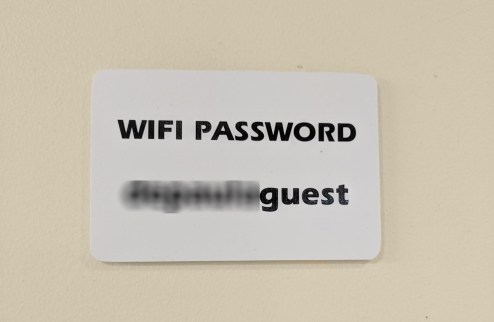
Don’t be lulled into a false sense of security if you see only a password posted.  It might be okay if there is only a single access point available but more likely you’ll see many. While one may be legitimate, any other might be a hacker who has set up access with the same password and is waiting to steal your data.
null-e1566133304167.png
Enjoy Your Coffee

20150523_135103

You take your latte and your laptop and find a table at your favorite coffee shop. There’s a sign on the wall telling you the name of their Wi-Fi access point and the password you need to connect. Is it safe? Likely. You and your host have done all you can to make your wireless networking as secure as practical. Their router could be infected with malware, your bank or email provider may have been hacked, or any number of other things beyond your control could still make your digital life difficult but go ahead. Connect and log on using your strong password. You do have a strong password, right? We’ll leave that discussion for another day.


Rules for Network Providers

Providing free Wi-Fi to your customers is a service. But please do it right and don’t put them and their information at risk. It’s not hard.

  1. Give your access point a clear, specific name. Don’t be generic like “Free Wi-Fi” and don’t accept the default name that your router provides.
  2. Enable the highest level of Wi-Fi security your router provides. Today that’s likely WPA2 but WPA3 is coming.
  3. Set a clear password for your access point. Unlike login passwords, Wi-Fi passwords don’t need to be complex or obscure.
  4. Clearly display the name of the access point and the password on a professional-looking sign. A wrinkled piece of copier paper might have been taped up by a visiting Bad Guy.
  5. Don’t make me land on an advertising page when I connect. (OK, that last one is just my personal pet peeve. But really. Just cut it out.)
 
Leave a comment

Posted by on August 19, 2019 in Cybersecurity


Client Management with Git

I don’t mean to suggest that Git is a CRM tool, but rather that Git has features that you can employ to manage code for multiple clients in ways that make them happier and you more efficient.

At various times in my career, I’ve worked on code that was mostly shared across projects for several different audiences. As an independent consultant, I had utility code that I employed solving problems for various clients. As a developer at a maker of OEM systems, I lightly customized common feature code for numerous customers. And when building plugins for large systems, a lot of glue and foundation code can be shared between different implementations.

The legal agreements around such work often require that the client have access to the source but, in my experience, that access is rarely exclusive. If you can make common code common and still share all the code used by a client with that client, you are more efficient because you don’t have to reinvent the wheel every time and they receive more robust solutions that build on code shared with other implementations. It’s not quite the “many eyes make all bugs shallow” ideal of open source, but it has some of the same advantages. The key to this reuse is disciplined branch management. In the rest of this post, I’ll show you how.

Consider a project being done for Acme Widgets, developed with an eye toward portability and modularity. Details of software modules and implementation language really don’t matter, so I’ll simplify the discussion by illustrating with changes in a single text file.

Document Title

This document describes some software.

It has features.

It is customizable.

We get started by creating a repo for shared source and putting this text in a file, doc.txt.

$ mkdir shared
$ cd shared/
$ git init
Initialized empty Git repository in C:/Code/blog/shared/.git/
$ touch .gitignore
$ git add .gitignore
$ git commit -m "Shared: Initial commit"
[master (root-commit) 33dd3c5] Shared: Initial commit
 1 file changed, 0 insertions(+), 0 deletions(-)
 create mode 100644 .gitignore
$ emacs doc.txt
$ git add doc.txt
$ git commit -m "Shared: First version of document"
[master 85d0374] Shared: First version of document
 1 file changed, 7 insertions(+)
 create mode 100644 doc.txt

Let’s add some common features:

Document Title

This document describes some software.

It has features.

* Feature 1
* Faeture 2

It is customizable.

This common “code” is still on the master branch

$ git diff
diff --git a/doc.txt b/doc.txt
index f1cfe19..2c3bf02 100644
--- a/doc.txt
+++ b/doc.txt
@@ -4,4 +4,7 @@ This document describes some software.

 It has features.

+* Feature 1
+* Faeture 2
+
 It is customizable.

$ git add doc.txt
$ git commit -m "Shared: Add features 1 and 2"
[master 975c1d3] Shared: Add features 1 and 2
 1 file changed, 3 insertions(+)

Now that there is a base to build on, let’s start working on client-specific work. First, we create a repository for the client’s view of the project.

$ cd ..
$ mkdir acme
$ cd acme
$ git init
Initialized empty Git repository in C:/Code/blog/acme/.git/

Then, we make that client repository a remote for our shared repository.

$ cd ../shared
$ git remote add Acme file:///c/code/blog/acme
$ git remote
Acme

And make a client-specific branch in the shared repository.

$ git checkout -b acme
Switched to a new branch 'acme'

And add client notes to the document.

Document Title

This document describes some software.

It has features.

* Feature 1
* Faeture 2

It is customizable.

Acme-specific features include:

* Feature A
* Feature B

And check them in on the client-specific branch.

$ git diff
diff --git a/doc.txt b/doc.txt
index 1dda3c5..737c272 100644
--- a/doc.txt
+++ b/doc.txt
@@ -8,3 +8,8 @@ It has features.
* Faeture 2
It is customizable.
+
+Acme-specific features include:
+
+* Feature A
+* Feature B
$ git add doc.txt
$ git commit -m "Acme: Add features A and B"
[acme 89547d7] Acme: Add features A and B
 1 file changed, 5 insertions(+)

In discussion with Acme, you find that their Feature C really has general utility, so you choose to add it as Feature 3 to the common code. To do this we work on the master branch then merge that common change onto the client branch.

[master 53f5a0c] Shared: Add feature 3
$ git checkout master
Switched to branch 'master'
$ emacs doc.txt
$ git diff
diff --git a/doc.txt b/doc.txt
index 2c3bf02..5daa37c 100644
--- a/doc.txt
+++ b/doc.txt
@@ -6,5 +6,6 @@ It has features.

 * Feature 1
 * Faeture 2
+* Feature 3

 It is customizable.
$ git add doc.txt
$ git commit -m "Shared: Add feature 3"
[master 53f5a0c] Shared: Add feature 3
 1 file changed, 1 insertion(+)

$ git checkout acme
Switched to branch 'acme'
$ git merge master
Auto-merging doc.txt
Merge made by the 'recursive' strategy.
 doc.txt | 1 +
 1 file changed, 1 insertion(+)

All this work is local and has a global view of common and client-specific features. When it is time to share the development with the client, you push just the client-specific branch to the client-specific repository.

$ git push Acme acme:upstream
Counting objects: 18, done.
Delta compression using up to 4 threads.
Compressing objects: 100% (16/16), done.
Writing objects: 100% (18/18), 1.60 KiB | 0 bytes/s, done.
Total 18 (delta 5), reused 0 (delta 0)
To file:///c/code/blog/acme
 * [new branch] acme -> upstream

Your work for Acme is done and you are lucky enough to land a new contract with Evil Corp. You negotiate with them to implement Feature 4 (something sufficiently generic that other clients might use it) and Feature Alpha just for them. Evil Corp benefits from your work for Acme and you begin by checking out the master branch and implementing Feature 4.

$ git checkout master
Switched to branch 'master'
$ emacs doc.txt
$ git diff
diff --git a/doc.txt b/doc.txt
index 5daa37c..2f6a3a6 100644
--- a/doc.txt
+++ b/doc.txt
@@ -7,5 +7,6 @@ It has features.
 * Feature 1
 * Faeture 2
 * Feature 3
+* Feature 4

 It is customizable.
$ git add doc.txt
$ git commit -m "Shared: Add feature 4"
[master c5ee2e8] Shared: Add feature 4
 1 file changed, 1 insertion(+)

Then create a client-specific branch for Evil Corp and add their feature.

$ git checkout -b evil
Switched to a new branch 'evil'
$ emacs doc.txt
$ git diff
diff --git a/doc.txt b/doc.txt
index 2f6a3a6..53108fc 100644
--- a/doc.txt
+++ b/doc.txt
@@ -10,3 +10,7 @@ It has features.
 * Feature 4

 It is customizable.
+
+Evil Corp features include:
+
+* Feature Alpha
$ git add doc.txt
$ git commit -m "Evil: Add feature alpha"
[evil 65eab70] Evil: Add feature alpha
 1 file changed, 4 insertions(+)

In testing the release for Evil Corp, you find and fix a problem with Feature 2.

$ git checkout master
Switched to branch 'master'
$ emacs doc.txt
$ git diff
diff --git a/doc.txt b/doc.txt
index 610f380..2f6a3a6 100644
--- a/doc.txt
+++ b/doc.txt
@@ -5,7 +5,7 @@ This document describes some soft
 It has features.

 * Feature 1
-* Faeture 2
+* Feature 2
 * Feature 3
 * Feature 4

$ git add doc.txt
$ git commit -m "Shared: Fix a bug in feature 2"
[master 4488af0] Shared: Fix a bug in feature 2
 1 file changed, 1 insertion(+), 1 deletion(-)

And merge that fix into the Evil branch.

$ git checkout evil
Switched to branch 'evil'
$ git merge master
Auto-merging doc.txt
Merge made by the 'recursive' strategy.
 doc.txt | 2 +-
 1 file changed, 1 insertion(+), 1 deletion(-)

Finally, you deliver the code to Evil Corp.

$ cd ..
$ mkdir evil
$ cd evil/
$ git init
Initialized empty Git repository in C:/Code/blog/evil/.git/
$ cd ../shared/
$ git remote add Evil file:///c/code/blog/evil
$ git push Evil evil:upstream
Counting objects: 24, done.
Delta compression using up to 4 threads.
Compressing objects: 100% (22/22), done.
Writing objects: 100% (24/24), 2.17 KiB | 0 bytes/s, done.
Total 24 (delta 7), reused 0 (delta 0)
To file:///c/code/blog/evil
 * [new branch]      evil -> upstream

At this point, Acme notices the bug in Feature 2 and asks you for a fix. Lucky you, you already fixed it. If Acme is willing to accept Feature 4, you can just merge your master to acme.

$ git checkout acme
Switched to branch 'acme'
$ git merge master
Auto-merging doc.txt
Merge made by the 'recursive' strategy.
 doc.txt | 3 ++-
 1 file changed, 2 insertions(+), 1 deletion(-)

If they are not, you can cherry-pick the fix for Feature 2 from master to acme. In either event, you then push your update to them.

$ git push Acme acme:upstream
Counting objects: 9, done.
Delta compression using up to 4 threads.
Compressing objects: 100% (9/9), done.
Writing objects: 100% (9/9), 907 bytes | 0 bytes/s, done.
Total 9 (delta 3), reused 0 (delta 0)
To file:///c/code/blog/acme
   20a8851..eb3f53a  acme -> upstream

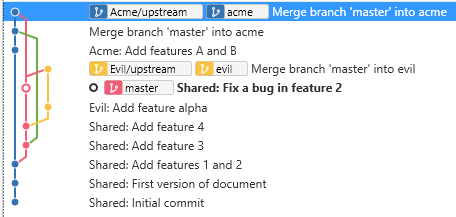
At this point, you can see your work for both clients.

Overview of all code

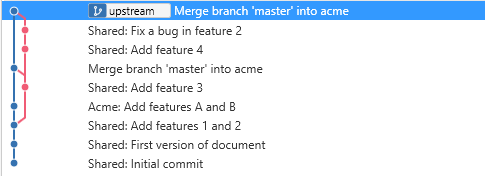
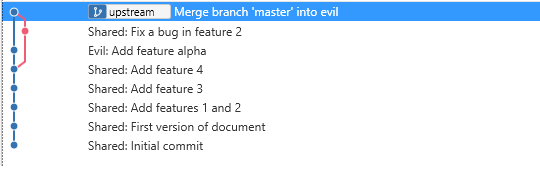
But your clients can only see the common code and their client-specific code.

Acme’s view of their code

Evil Corp’s view of their code

Furthermore, your clients can update their code (or the common code) and share it with you on their upstream branch. You can fetch that branch and cherry-pick fixes from it to your master branch to share with other clients as appropriate.

 
Leave a comment

Posted by on March 19, 2018 in Uncategorized


Code Review in Three Words

I was recently at a networking event chatting with a non-technical acquaintance.  I mentioned that I was mentoring a new member of my team who was going to start reviewing some of my code soon.  I analogized that no one would consider publishing a book without an editor, and code needed a second set of eyes as much or more than prose did.  It got me thinking about how publishers have style guides that can be used as references when editing and I needed some way to explain to this young developer what to look for as he began to review my work.  Some teams have rigorous style guides and certain languages have favored idioms, but I was looking for something more generic and ended with these three broad guidelines.

Is it Correct?

If an article about Abraham Lincoln mentioned “the president’s wife, Martha” an editor might recognize the wrong president’s wife was named and easily make the correction.  Unless the article was about Presidents’ Day or some other topic that discussed the first and sixteenth presidents, then the editor might have to go back to the author and ask for a clarification.  Similarly, some code is clearly wrong on its face and some less obviously so, but in both cases careful reading by a fresh set of eyes can reveal many — but likely not all — the places that the code is incorrect.

Is it Consistent?

Sports writers have a special talent for finding hundreds of different ways to say “won” or “beat.”  Writing software isn’t — shouldn’t be — nearly as creative an endeavor.  If you create one object you don’t add another, unless that difference in term indicates a difference in use.  If “close” is the opposite of “open,” it is always the opposite of open, never “shut” or “seal” or “drop.”

Is it Complete?

When the anchor of the nightly news tells you that a stock market index is up 200 points today, what do you make of it?  Nothing, really; you have no information to go on.  Numbers with units — points in this case — are meaningless.  A 200-point swing in the Dow is very different than the same change in the NASDAQ.  Without a basis for comparison — like the value of the index — the story is incomplete.  If you were told it was up or down 5% or 15% then you have reason to cheer or worry.

What if your favorite sports team’s rival played yesterday and you wonder how the game turned out.  The sports section may be full of scores and commentary, but if the game you are interested it isn’t covered, the section is incomplete.

Putting it All Together

Software can be complex and subtle and reviewing it is not trivial and must be done on several levels.  As an analogy, consider the recent sales listed in the real estate section of my Sunday paper.  There is one item after another like:

Alice and Bob Smith bought property at 704 Main Street from Ted and Carol Jones for $195,800.

There are hundreds of these items county by county (in alphabetical order) and town by town within county (also alphabetical).  The items themselves seem to be unordered, perhaps they are by transaction date.

Is it correct?

The names of the parties, the address, and the price in each item are verifiable.  There is a record of sale somewhere that can be consulted to be sure that the facts are correct.  If a few letters in the middle of the listing were in italic or bold or a different typeface, you could reasonably argue that is incorrect, too, though at a different level.

For software, the source of truth about the software’s intent is the design, sometimes reflected in a test it is expected to pass.  When revising software to address a bug, you must reference the ticket where the bug is described to know what the wrong and expected behaviors are in order to assess the correctness of the code.

Is it Consistent?

Occasionally the real estate sales include an item like

Betty and Barney Rubble bought property at 1 Gravel Lane from Acme Relocation Services for $1,234,567.

This is noteworthy because the seller is a company.  More subtly, you might also have noticed in the first example that one couple is listed woman first and the other man first.  Is that intentional?  Perhaps the listing just echoes the names as they appear on the deed.  Or perhaps they are intended to always be in alphabetical order (in which case the Ted and Carol are in the wrong order).  Once you are accustomed to the standard format, exceptions stick out.

This happens with software, too.  If two pieces of code do very similar things, they should differ only in the ways that are necessary.  Unexplained or unnecessary differences should cause the reviewer to pause and wonder if they are also unjustified.

Is it Complete?

On a rare weekend, the listing of sales omits my town.  It is hard for me as a reader to tell if single transactions are missed with more regularity.  If I were tasked with editing or reviewing that section I would need a checklist of all the communities covered and their counties.  That list could be used week after week.  I’d also need at least a count of transactions per town and overall as a first check of completeness.  And if accuracy was paramount, I’d want some form of the sales records to reconcile the listings with.

Even a simple software system may be built around several different classes.  For classes that may be stored as records in a database, each needs code to create, read, update, and delete instances.  Your classes have to cover all those operations for all the classes (or your comments need to explain why, say, one object is immutable after creation).

That system should have a test suite that covers creating an instance of each class in each way that is meaningful (using default values, using overridden values, using invalid values, etc.).  It should test retrieving or reading each class, including trying to get one that doesn’t exist.  It should test updating an instance of the class with no changes, with valid changes, with incompatible changes to values, etc.  It should read and attempt to update one that is deleted between the operations.  It should test deleting objects, including trying to remove one that doesn’t exist.

The combinatorics add up quickly — like the sales in towns and the towns in counties — and reviewing the code of the implementation and the tests that verify can be painstakingly detailed work.  But if the system is important enough, it is necessary.

That’s my 1,000-word take on three watch words for code review.  Are they enough?  Probably not.  But I hope they provide a starting place for novice reviewers as they develop their reviewing skills.

 
Leave a comment

Posted by on November 1, 2017 in Uncategorized


Tags: ,

Why Make an API You Can’t Use?

I like tools and process and in my software development work this has led to customizing tools to support very productive workflows for me and my team.  I’ve written before about How to Deliver Software On Time (or Know Early That You’ll be Late).

Since then a lot has changed in my work environment.  I’ve moved from developing for embedded Linux to developing for enterprise Windows.  I’ve changed from using Bash, C, and Python to using C#, PowerShell, and JavaScript.  And the tools supporting my workflow have changed from the integrated but extensible Trac system to the Atlassian suite (Confuence, BitBucket, and JIRA).  But reliable software delivery still relies on estimating your schedule and monitoring your progress.  I’ve found that JIRA falls somewhat short in supporting these needs and, worse, seems to try to prevent you from building better tools.

To monitor your software development progress, you have to

  1. Set an initial estimate
  2. Record work against that estimate
  3. Extract and analyze the work data

JIRA supports the first two steps moderately well.  When you create or edit a ticket you can set an Original Estimate or revise the Remaining Estimate.

Estimate Entry

In Trac, you can record time whenever you comment on a ticket.  JIRA separates comments and work log entries (which can also have a comment).  It is possible to view All Activity and see both, plus more, but I find that to be rather busy.  Still, you can record time and notes about what the time is for.

Log Work from Ticket

The “Date Started” defaults to now, which means you are recording what you are going to do for the next time period unless you manually update that field.

Unfortunately, just as the Atlassian suite has several different, incompatible ways to enter text, logging time has several different, incompatible ways to enter time.  In addition to the ticket-based method shown above, there is a time sheet gadget that allows you to log work quickly in a little popup.

Log work from Time Sheet

Fast, but wrong.  As in ticket-based time entry, the start time is now and you are logging time in the future.  You can fix that by clicking the “more options” link.  Strangely, this does not take you to the same dialog as entering time from a ticket.

Log Work detail from Time Sheet

Date, hour, minute, and AM/PM are separated into four fields.  Not such a big deal except there is some automation attempting to “validate” these values which in my experience not only sets them consistently wrong, but interferes with your ability to type in the right data.  (Pro tip: When in these fields Ctrl-A will highlight all of the text and then you can type in the right value.)

But if getting time tracking data into JIRA is frustrating, trying to get it out is infuriating. You can use JQL to get an overview of tickets matching a filter.  But unlike Trac’s query-based reports, you can’t control the format of the result.  Also, worklog details are not exposed to JQL so you can query for tickets you logged work in but not for the details of the work you logged.  In any individual ticket, you can view the Work log, which shows you who logged time, how much, and when, but you can’t filter that to see work logged in a time range.  And the timesheet gadget mentioned above will show you all the time you have logged in a week but it totals each ticket each day.

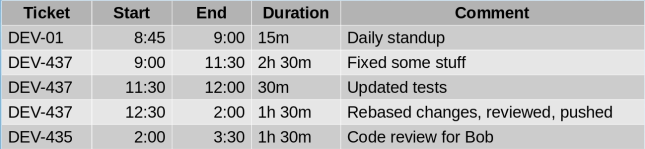
To keep track of my time, I want JIRA to answer the question “What did I just do?” with something like:

Prototype

As I said, JIRA doesn’t have reports but I have a couple of options if I want to customize the presentation of some data like this.  Like Trac, JIRA has a plugin architecture.  However, JIRA Cloud doesn’t allow custom plugins.  Like a lot of cloud software, JIRA Cloud has REST APIs to access its data.  While less integrated than a plugin, I should be able to write a little web app to get data with the JIRA APIs and display it with something like AngularJS.  Here I find myself amending one of the conclusions of my previous post to say that your tool needn’t be local and data-based (giving you free access to tables) if it is sufficiently open and API-based.

JIRA publishes an extensive API to access its data.  For my purposes, I need the results of a filter:

/rest/api/2/search?jql=filter=<filterNumber>

and the worklog details for a ticket:

/rest/api/2/issue/<ticketKey>/worklog

I said I should be able to write a little web app, but it was not that simple.  I prototyped my API usage with CURL

 curl -D- -X GET 
     -H "Authorization: Basic ..." 
     -H "Content-Type: application/json"
     https://xyz.atlassian.net/rest/api/...

and got the expected results, but the same headers and URL returned no data to JavaScript.  Turns out I was running into a browser security feature designed to combat cross-site scripting and prevent, say, a Facebook quiz from accessing your bank account with stored credentials.  However, having a web page or web-based application access multiple domains on the Internet is so useful that there is a protocol that allows it in a controlled way.

Cross-Origin Resource Sharing is supported by servers and enforced by browsers and uses a “pre-flight check” to negotiate what data an app can access.  Curl doesn’t enforce the limitations in CORS so my test worked fine, but Chrome enforces them strictly so my app wouldn’t work.

Actually, the problem is not that Chrome enforces CORS, but that JIRA Cloud doesn’t implement the server side of the protocol.  There is an open ticket about it (JRASERVER-59101) which Atlassian doesn’t seem to be in any hurry to address (thus the title of this post).  If you use JIRA Cloud, I urge you to click though that link and add your voice to those asking for it to be addressed.

Undeterred, I found a Chrome plugin that can relax rules in the browser in a controlled way.  With the Allow-Control, Allow-Origin plugin you can configure patterns of URLs for which CORS will be disabled.  When you install it you get a little green light in the tool bar and when you click that you can enable the plugin and configure patterns.

Extension

Because of the potential security hole this opens, each time you restart your browser you must enable the plugin and enter the URL(s) again but for me that’s a small price to pay.

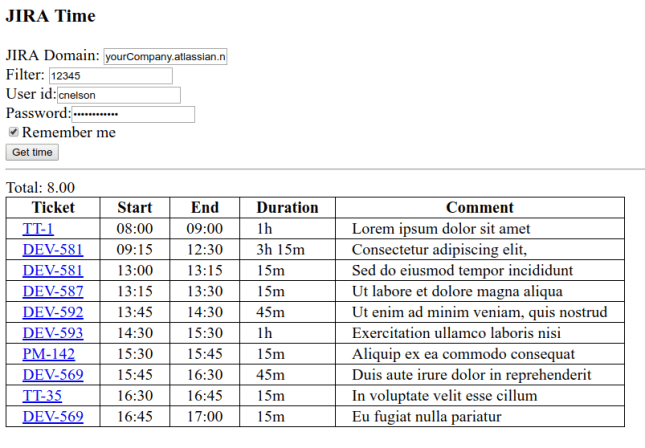
With all of this in place, I was able to get the report I want.  I spent most of my time on function and not aesthetics but it does what I need.

sample2

From this I can tell I forgot to log some time between 9 and 9:15 and seem to have taken a half hour lunch. Monitoring this report during the day I have a chance to fill in gaps while I still remember what I did and my time tracking is much more accurate because of it.

If you’d find such a report useful, I’ve posted the code on GitHub.  Clone the repo, open the web page, fill in the fields and click Get time.  The license is GPL so use it and enhance it as you wish.  I’ll happily consider pull requests if you make it better.

 
Leave a comment

Posted by on September 24, 2017 in Project Management


A Smart Phone is a Computer

This summer I got a new car, my first with Bluetooth. Since then I’ve been refining the in-car experience with my smart phone and it led me to a conclusion about the state of the market in cell phones.

I had a car mount with a nice mechanism for one-handed load and release. And before I had Bluetooth having to hook up power as well as audio wasn’t that big a deal. But now that my phone audio connects with my car wirelessly, having to connect the USB for power seems a chore. I have a wireless charging case that I use with chargers on my bedside table and desk so I found a car mount by iOttie with a wireless charger built in.

With that dock, I can get in my car, put my phone in the dock, and it starts charging. If I have a podcast or music player paused, the presence of Bluetooth usually causes it to resume. So far so good. My home screen includes Google Maps for navigation but I usually have GPS turned off to save battery so actually navigating means getting to settings, turning on GPS, and accepting — for the 1007th time! — the terms of the location services. I thought there has to be a better way.

I’ve had phones with matching car docks that could tell they were in the car dock and run a car mode app. My current phone does not. I needed some way to make my phone know it was in the car (ideally, knowing if it was still in my pocket or put in the dock) then change settings (e.g., GPS on) and run an app (a third-party “car mode” or “dashboard” program). Bluetooth presence was one option but that couldn’t distinguish between dock and pocket. Another option was NFC tags. I had a packet of WhizTags so I decided to see what I could do with them.

The WhizTags folks recommended NFC Tasks which I found kind of awkward. I’d heard good things about Automate and decided to give it a try. Automate seems like a fairly flexible graphical programming environment. The limitations I run into are in the Android OS.

I want to set up “when the NFC tag in my car dock is tapped, turn on GPS.” There are recipes (or “flows”) available on the Automate community site to do that but they require “superuser” privileges; that is, you need to have “rooted” your phone. At least one dashboard I tried has a setting to enable GPS when it starts up so you’d think I could have Automate start the app when the tag is seen and have the app turn on GPS. But when the app starts up, the OS intercepts the attempt to turn on GPS and prompts me to confirm. The whole point is to have this all be automatic so this confirmation is a show stopper. If the confirmation had a check box for “always do this” I could work around it, but it doesn’t so I can’t.

I’d also like to be able to set up “when my phone is undocked, turn off GPS” but here I run into multiple problems. NFC seems to have no way to detect leaving the proximity of a tag; it’s not designed for that. Looking for options, I realized that taking my phone out of the dock and turning off my car happen pretty much at the same time, and turning off my car turns off its Bluetooth. So if I could react to Bluetooth disconnect, I’d have a reasonable heuristic for “undocked.” While Automate has a “Bluetooth device disconnected” trigger, when I try to use it I’m told it “isn’t officially supported by Android.” And, of course, even if that was supported, turning GPS on or off is a privileged operation.

In some sense, some of these difficulties arise from the fractured nature of the Android market; a monolithic or tightly controlled system like iOS would have fewer of these problems in coordinating software from multiple sources. But the deep issue here is that Google, Motorola, Samsung, LG, etc. don’t treat smart phones as the computers they are. Computers have a way for competent users to perform privileged operations. Windows has User Access Control. In Linux we have sudo. In stock Android the closest we come is being allowed to install programs from locations other than the Google Play store.

To have full access to the computer you own — a computer that happens to make phone calls — you need to “root” it by a method fraught with difficulty; every device has a different method, it doesn’t always work, and it has the potential to make the device unusable. What we need is a setting in Applications or Security for “allow root access” which just works out of the box. Typical users would never check — perhaps never find — that check box and their phones would continue to work as they do now. But “power users” could make full use of their pocket computer without jumping through hoops and something as simple, natural, and obvious as turning GPS on and off wouldn’t be a challenge.

I really believe that the device maker or carrier that realizes this will have a loyal following; it will provide the device of choice to people who want to make full use of their phones. (Perhaps one has tried and no one noticed or there were other reasons the device was not welcomed.) In my wildest dreams, someone at Google makes it a core part of Android N and even goes so far as to not allow it to be disabled in OEM versions. I can dream. In the meantime, I’m just frustrated.

 
Leave a comment

Posted by on January 4, 2016 in Uncategorized


Better is Worse

In the early 1990s, Richard P. Gabriel posited that “Worse Is Better” but could never quite decide if he meant it. In his essay, he contrasted what he called the MIT style of software development and the New Jersey style. He argued that the NJ style produced useful but incomplete, even flawed, tools like UNIX and C which grew incrementally — and perhaps sloppily — over time but by getting something into users’ hands early, the NJ style had a chance to develop a loyal following while the MIT crowd was still polishing their first release. Or at least that’s how I interpret it.

I was reminded of this recently in the context of another great divide of the software world. My wife and I have different tablets with different performance problems that I think illustrate a similar difference in design or market philosophy (or maybe an artifact of the Apple uniculture vs. the splintered Android market).

From time to time, I’ve been frustrated with the performance of my Asus tablet and, on inspection, find that there are simply too many applications trying to retrieve data and process it to tell me things my phone tells me perfectly well. (For example, there’s no good reason to have the mail or social media apps on my tablet poll for new data when my phone will alert me and I can manually download to the tablet.) When I uninstall these resource hungry apps or configure them to not poll, my tablet’s performance is restored and I go merrily on my way for a few more months when I need to disable or uninstall a new set of apps.

Whereas Google can’t seem to get its licensees to update devices, Apple seems to almost force users to update; my wife’s iPad is on its third version of iOS. Each new version comes with new software features; some support new hardware in new devices (fingerprint readers, force touch, etc.), but some are purely software, more complex algorithms accomplishing more complex tasks for the user. The problem is that they can’t do that on old hardware with limited resources without being unacceptably slow. This is great for Apple which will sell new hardware to loyal users, but not so good for more conservative users who’d rather get another year or two out of their hardware purchase.

I can see the benefit of having coordinated versions of iOS on your phone and tablet (and your computer, if you go that far), but I’m OK with Lollipop on my phone and Jellybean on my tablet. When a software update makes your device slow down — whether that update comes from Apple or a responsive Android developer — better is worse.

Update, Fall 2017: Android Oreo was purported to have improved performance vs. Nougat on the same hardware and my upgrade experience showed just that.  In a strange coincidence, iOS 11 seems to be doing the same thing for Apple devices in the field. Sometimes it’s nice to be wrong!

 
1 Comment

Posted by on November 21, 2015 in Uncategorized


What is a Professional Software Engineer?

A software engineer works with software systems of significant scope or importance and a professional engineer works in areas that may affect public welfare, so a professional software engineer must work with software systems that may affect public welfare. Some examples of such systems include:

  • Banking (e.g., ATMs, point of sale systems, electronic transfers, online banking)
  • Infrastructure (e.g., the electric grid, railroad switches, traffic lights)
  • Medical devices (e.g., pacemakers, insulin pumps)
  • Home automation (e.g., smart thermostats, nanny cams)
  • Automobiles (a typical modern car has 10 computers)
  • Industrial automation and process control (mechanical assembly, food or chemical production, or even power generation)

A structural engineer evaluating the plans for a bridge uses material science to determine if there is enough steel and concrete to support the weight of the vehicles that are expected to pass over the bridge. A civil engineer can calculate whether a theatre has enough emergency exits for all the patrons. So, what does a software engineer look for in assessing the safety of software or a software-enabled device?

Critical software should be designed not just thrown together. You may put together a quick spreadsheet to determine if you can afford a kitchen renovation, but the firmware in your gas stove requires more care. A design should guide the implementation and accurately describe the system after it is built. Often this design explicitly states what the system cannot — or is not designed to — do and these constraints and exclusions are important. The directions for your coffeemaker likely say “for residential use only” or some similar admonition because it is not designed to be safe and reliable when used to make pot after pot of coffee in a restaurant.

It is important to use appropriate components to build the software. You wouldn’t build a bridge out of modeling clay and you shouldn’t build critical software with a weak language or function library.

Software code is a written creative work and it needs to be reviewed. This is very much like the process of editing books or magazine articles. It’s foolish to think that an author can produce a flawless work of prose or that a programmer can produce a flawless program. Even a single review is often insufficient to catch all errors so the level of scrutiny needs to be appropriate to the application. You won’t hire a technical editor for your text messages but you might have several people look over your PhD thesis.

Software that we rely on needs to be tested by a testing specialist. It is insufficient for the programmer to run through some use cases that he or she thinks represent typical scenarios. The aforementioned coffeemaker most likely has a UL label indicating that the design has been tested extensively to make sure it is safe for residential use. Similarly, software can be professionally and independently tested. Whether that testing is by a separate test group in the programmer’s company or by an outside lab will vary based on the safety requirements.

In many states, automobiles have to undergo periodic safety inspections. A car won’t run forever. Brakes and headlights and other critical parts age and your car needs maintenance to remain safe. The inspection, in part, ensures that such maintenance is not neglected. Software, too, can age. Heartbleed and other high-profile security problems are just one of the things to be concerned with. Software that is not maintained, that does not have a group or company standing behind it, is potentially dangerous. This support needn’t come from the original manufacturer — there are lots of historic cars still on the road, lovingly maintained by their owners — but it must exist.

A professional software engineer can and should assess the safety and reliability of software based on whether the system is well designed, well built, has been reviewed and tested, and is supported. Experience and judgement allow him or her to determine how much of each of these applies in each case.

 
Leave a comment

Posted by on October 6, 2015 in Definitions


Tags: