This is part 4 of a series of posts on software project management. The series starts with Managing Software Projects Part 1: Tools. Start there to get the whole story.
“No battle plan survives contact with the enemy.” — Helmuth von Moltke
The Gantt chart, the work breakdown, and task estimates, especially, are dynamic; they change throughout the life of a project. So, how do you plan for change in a way that allows you to still meet your deadline? Francis Patrick proposes Critical Chain Scheduling and Buffer Management. It’s worth reading the whole paper but I’ll give my take on it here.
What Patrick is trying to do is avoid both Parkinson’s Law (Work expands to fill the time allotted) and Student Syndrome (Everything gets done at the last minute) by pushing the pad — or buffer — to the end of the project.
Task Estimates
When you ask a developer for an estimate, he or she will give you a number but the time it takes to perform a task is really a point on a distribution. You can visualize this as a Weibull distribution like the one below. The area under the curve is 1 unit and you can read the chart as meaning the area to the left of a vertical line is the probability of the task being done by that time on the x axis.
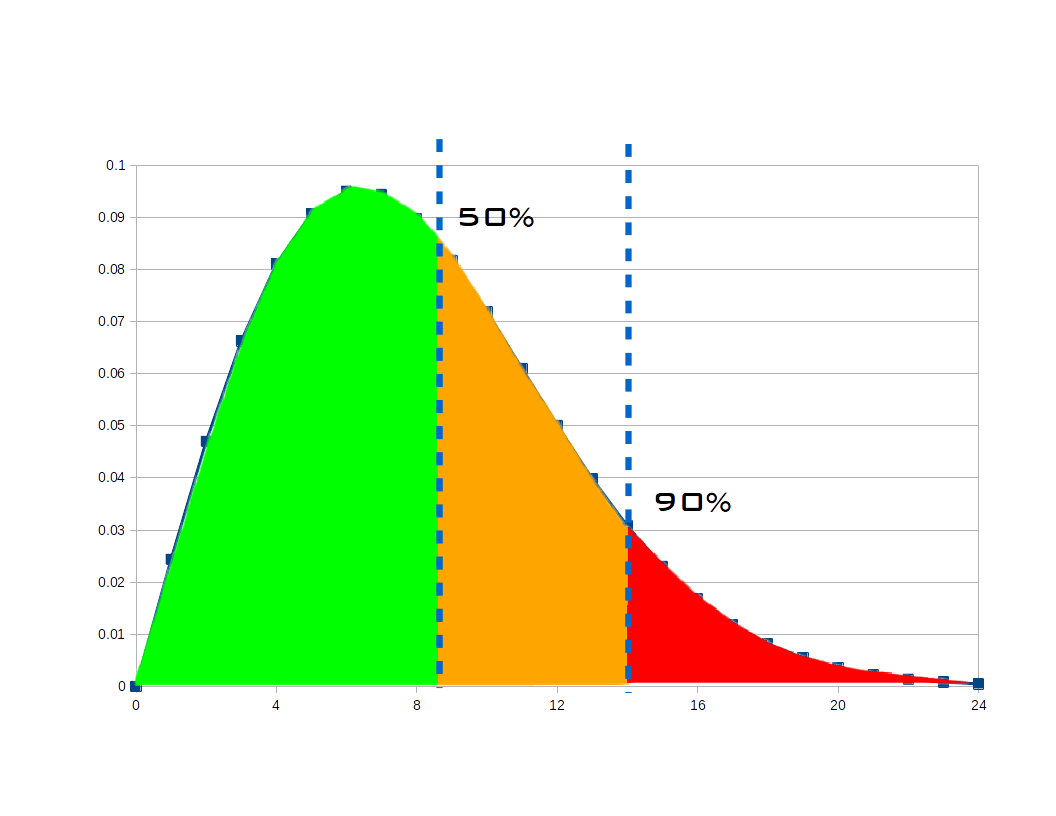
Developers like to meet their deadlines so they are likely to give you a number that they are fairly confident accounts for some things going wrong. Consider the right line on the chart and see that there’s a 90% chance the task would be done in approximately 14 hours. That’s the kind of number you usually plan around. But if you have a bunch of tasks, errors will tend to cancel: some will take more time than expected, some will take less. What if we planned around estimates that we were as likely to be under as over? That is the 50% line in the chart. That’s about 8.5 hours instead of 14, a big improvement.

Project Buffer
When you string together several tasks, using the 50% confidence estimate shortens the schedule considerably. But I mentioned a buffer before. We want to add a little bit of a pad after the estimated completion of the last task and use that padded duration to set our project deadline. We could add a flat 30% or something but since we have a lot of data to work with and a computer is figuring it out for us, we can do better.
- Compute the buffer
- Find critical path
- Total estimates
- Compute weighted confidence
- Buffer = total estimate * f(weighted confidence)
- Compute project makespan
- Makespan = estimate + buffer
- Figure out when you’ll finish
- Project finish = Project start + Makespan
Note that nowhere in this calculation have we assigned due dates for the individual tasks in the project. The tasks are ordered based on the schedule with the intention that the first task should be started now, the next as soon as that’s done, etc. This tends to avoid the procrastination that arises from thinking “This 1-day task isn’t due until next week, so I don’t need to start it now.” If you wait to start and then realize you underestimated, you may not be able to finish on time.
Example
As an example of calculating and using a buffer, let’s look at the project from Part 2.
| Task | Estimate | Confidence | Value |
|---|---|---|---|
| 1.0 Develop UI | 90 hours | Medium-High | 2.39 |
Patrick has some academic idea of how much buffer you should have. The specifics are hidden behind the f(confidence) in the outline above. I feel it is really specific to your team, experience, business, etc. The function can be linear, exponential, or something more complicated as fits your need.
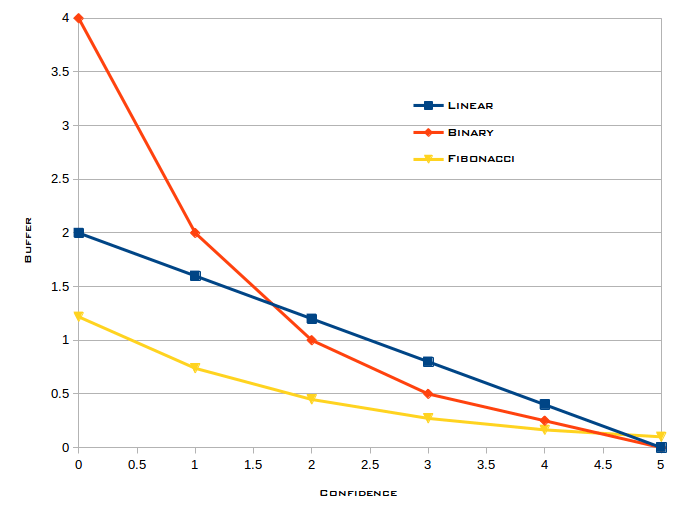
If we use the binary curve from the figure, we determine the buffer multiplier by going across the x axis to find 2.39, go up to the curve, then go left to find the multiplier on the y axis, in this case around .8. Our buffer is (.8 * 90) = 72, and the project makespan would be (90 + 72) = 162 hours. If you assume your developers get 30 productive hours in each week (allowing for meetings and other distractions), that suggests the UI would be done 5.4 weeks after work on it begins.
Next
In the next post, I’ll discuss monitoring the progress of your project.
2 responses to “Managing Software Projects Part 4: Estimating completion”